
Appearance
5. Payroll, payslips and statutory files
Back to the case study · Previous: 4. Service contracts, assignments and duties · Next: 6. Client billing under GST
5.1 The September run
People & Payroll > Payroll Runs. Create a regular run for 1 to 30 September, paid on 7 October, then Calculate. The duties from chapter 4 decide the paid days; the salary structure decides the rest.
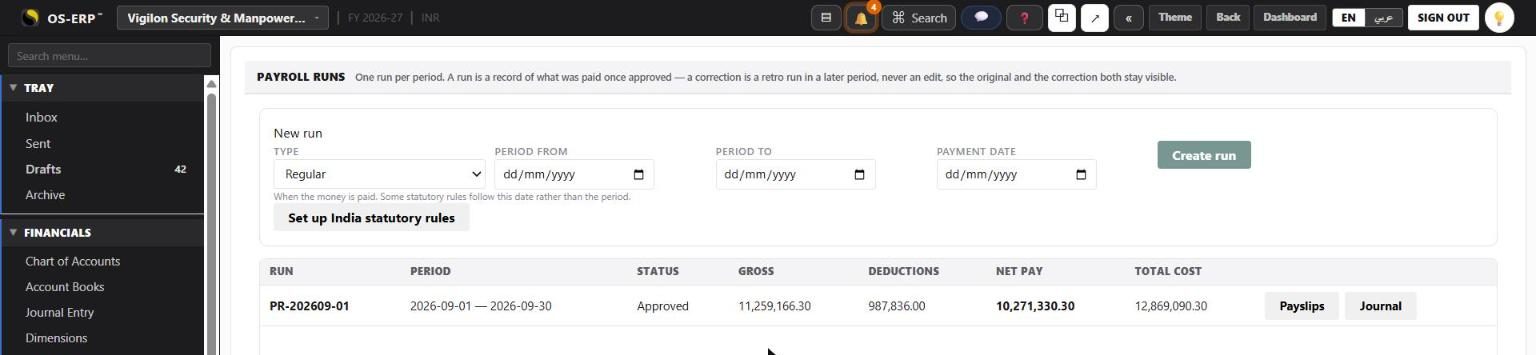
| INR | |
|---|---|
| Gross earnings | 1,12,59,166.30 |
| Deductions (PF, ESI) | 9,87,836.00 |
| Net pay | 1,02,71,330.30 |
| Total cost with employer PF, ESI and the gratuity provision | 1,28,69,090.30 |
Approving the run is a separate permission from calculating it. Journal posts it to the ledger through the voucher transaction, like every other journal.
5.2 The payslip
Payslips on the run, or the Payslips tab on a person, or the person's own My Work screen, all show the same payslip. It is laid out for A4 and readable on a phone.
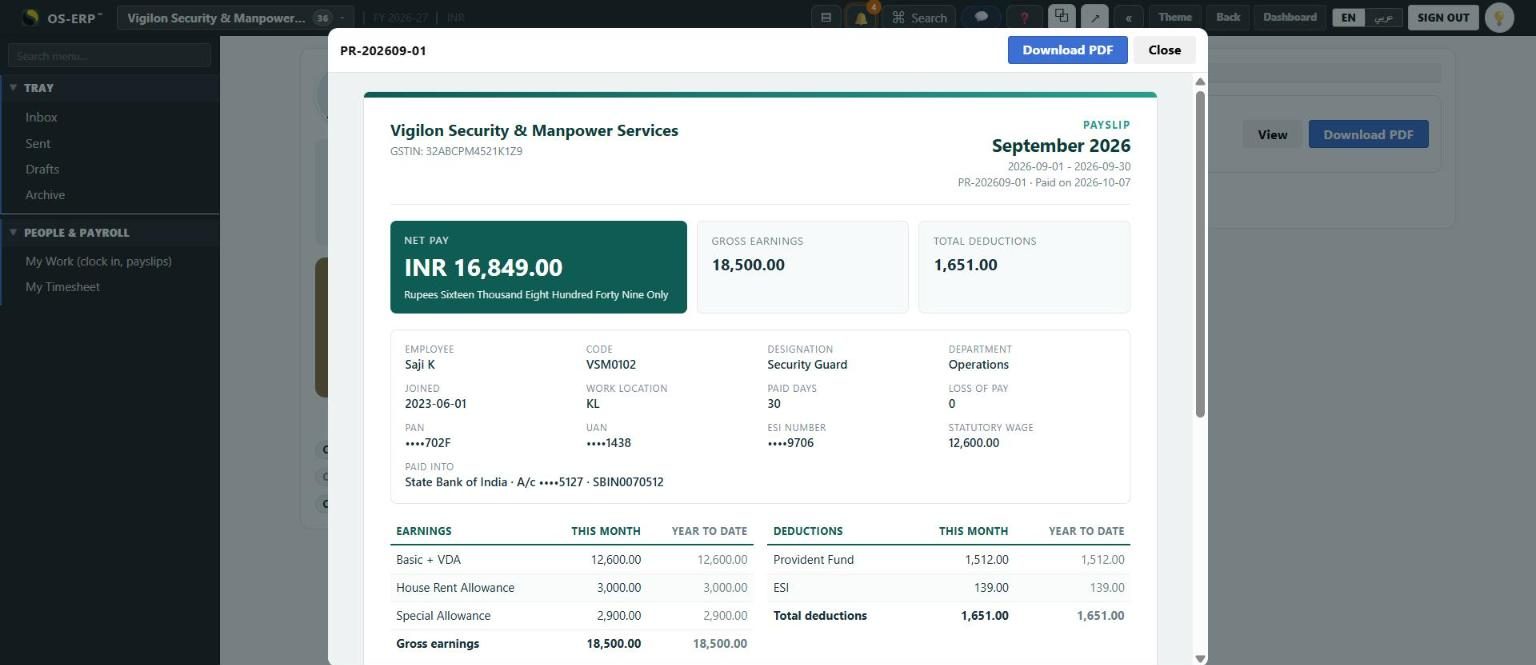
- Net pay first and largest, in figures and in words, beside gross earnings and total deductions.
- Who and which month: name, code, designation, department, joining date, work location, paid days and loss of pay, PAN, UAN and ESI number (masked), the statutory wage contributions were computed on, and the bank account the pay went into (masked).
- Earnings and deductions side by side, each with This month and Year to date from the start of the financial year.
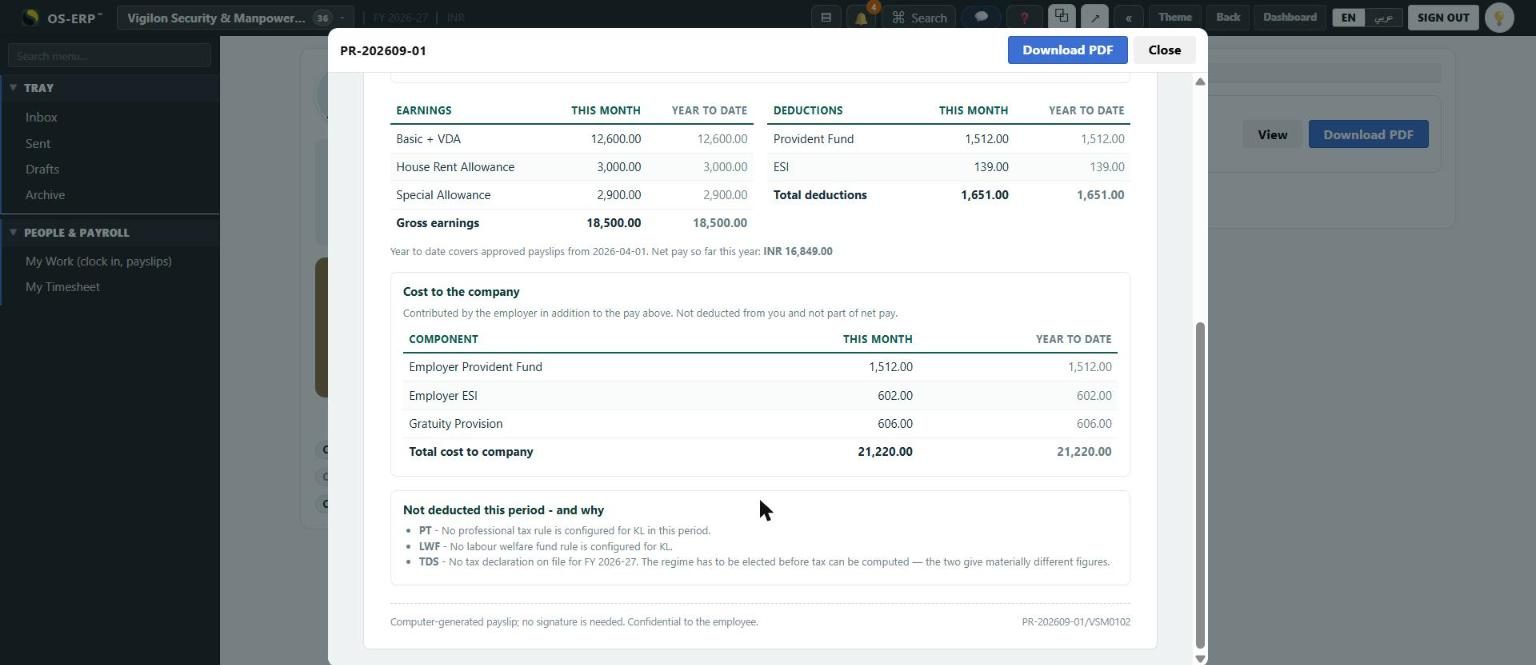
- Cost to the company: employer PF, employer ESI and the gratuity provision, kept apart from the pay. They are not deducted from the employee and are not part of net pay. A payslip that folds the employer's PF into "total earnings" claims a higher salary than was paid.
- Not deducted this period, and why. Here it says no professional tax and no labour welfare fund rule exists for Kerala, and no tax declaration is on file (Saji's income is below the taxable limit). OSERP ships professional tax rules for Karnataka, Maharashtra, West Bengal and Tamil Nadu, so Vigilon's guards in Karnataka and Tamil Nadu have it deducted. Kerala's professional tax is a half-yearly tax collected by each local body, so OSERP does not ship it: the company enters its corporation's slabs as a state levy (chapter 1). Vigilon did so with effect from 1 October, after this run; the September payslip says so rather than deducting a guessed figure, and October's deducts it.
- A computer-generated footer and a reference (run number and employee code) for anyone checking it later.
Download PDF opens the payslip on its own and the print dialog; choose Save as PDF to keep a copy.
5.3 My Work: clock in, my month, my payslips
Saji K signs in with the Employee role. He lands on My Work, not on a dashboard he has no use for, and sees only his own company.
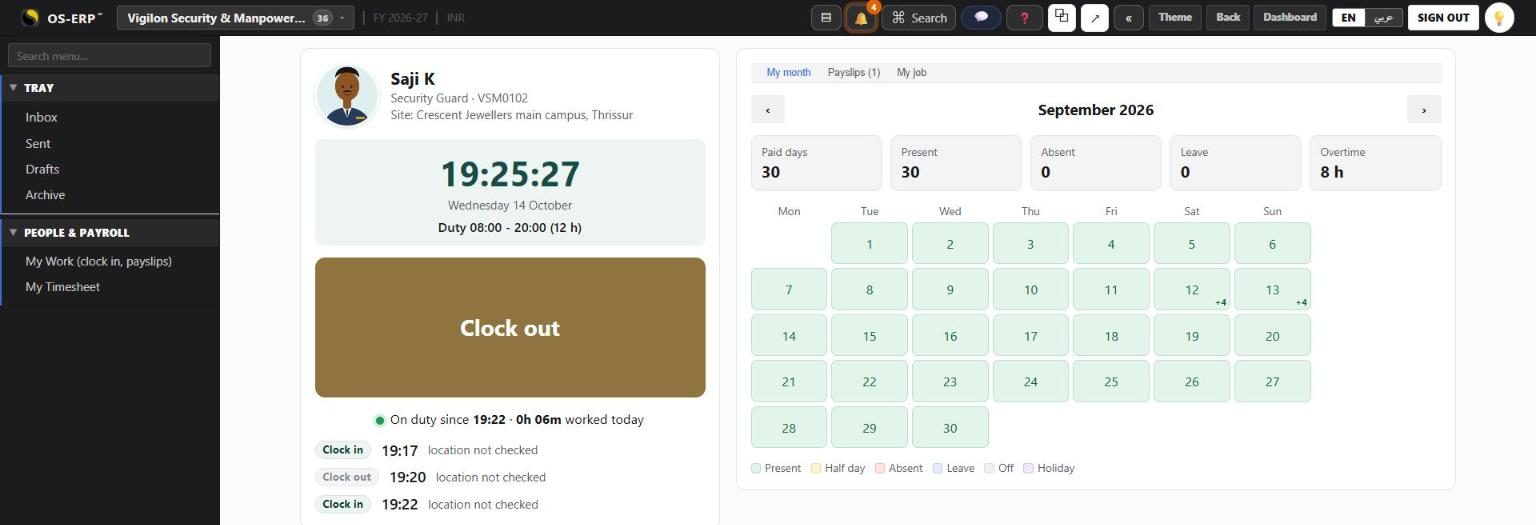
- The clock and one large button. It reads Clock in or Clock out from what the day already holds, never from what was last tapped, so a stale tab or a second phone cannot file two clock-ins. The server stamps the time; the phone's clock is never asked. If the company checks location, the phone's position is sent with the punch and judged against the site.
- On duty since the first clock-in, the hours worked today, and today's punches below it.
- My month: a calendar coloured present, half day, absent, leave, off and holiday, with paid days, overtime and the counts. Today stays uncoloured until it is over, so a guard three minutes into a twelve-hour duty is not shown as absent.
- Payslips: every approved month with its net pay, View and Download PDF. A run that is not yet approved does not appear.
- My job: duty time, weekly off, joining date, the site, the job description and the responsibilities from chapter 2.
Every read resolves the employee from the sign-in. There is no number in the address naming whose payslip it is, so nothing on this screen can open somebody else's.
To switch it on: register one mobile attendance device under Integrations > Attendance Devices (optionally with the site's location and radius), link each person's login to their employee record, and give them the Employee role. Every working role now also carries the two self-service permissions, so staff in other roles get My Work too.
5.4 The statutory files
Statutory Compliance > Files & registers: choose the run.
| File | What it is |
|---|---|
| EPF ECR file | The text file uploaded on the EPFO employer portal: one line a member, UAN, name, gross wages, EPF, EPS and EDLI wages, contributions and NCP days. The wage and pension figures are the ones payroll actually used, read from each payslip's own working, so the file matches the deduction to the rupee. September: 600 members, EPF wages 75,75,999, employee share 9,09,171, pension 6,31,332. |
| ESI contribution file | The upload for the ESIC portal: IP number, name, days paid, wages, and a reason code for anyone with no working days. |
| Register of wages | The statutory register: days paid and lost, each earning and deduction, net pay and the payment date. |
| Muster roll | The month's attendance, one row a person. |
People without a UAN or an IP number are listed and left out of the file, because the portals reject the whole upload for one bad row.
5.5 Minimum wage check and bonus
Minimum wages > Check a payroll run compares each person's basic plus VDA with the rate in force for their state, zone and skill on the last day of the run, prorated for the days paid. September: nobody below.
Bonus computes the Payment of Bonus for the year: eligibility (wages up to the ceiling, 30 working days), wages for bonus capped at INR 7,000 or the minimum wage, whichever is higher, and the declared rate between 8.33% and 20%. Bonus for Vigilon falls due by 30 November.