
Appearance
3. A CRM for a manpower company
Back to the case study · Previous: 2. People, photographs, papers and duties · Next: 4. Service contracts, assignments and duties
3.1 The manpower pack
Administration > Module Settings > CRM > CRM Settings > Industry: choose Manpower, security and overseas recruitment. It writes ordinary pipelines, fields and lists that can be edited afterwards:
| Pipeline | Stages | What it tracks |
|---|---|---|
| Security and manpower contracts | Enquiry, Site survey done, Rate proposal sent, Negotiation, Contract signed, Lost | A client asking for guards or staff at a site |
| Overseas employer demands | Demand received, Agreement and power of attorney, Sourcing candidates, Employer interviews, Demand fulfilled, Demand cancelled | A Gulf employer asking for workers |
| Renewals and rate revisions | Renewal due, Revised rates proposed, Renewed, Not renewed | An existing contract coming up for renewal |
Fields include the service, the people required, shifts, the site, the country for an overseas demand and the commission per worker. Sources include Existing client, Tender / GeM portal, Overseas employer, Sub-agent and Job fair.
The workforce packs (chapter 1) added two more pipelines of kind Hiring: Hiring for our own team and Placing workers abroad. Hiring is not a separate module with its own stages: a candidate's application is a CRM record like any deal, worked on the same board, with the same tasks, inbox and messages, under the CRM's Hiring tab (chapter 7).
The workforce packs (chapter 1) added two more pipelines of kind Hiring: Hiring for our own team and Placing workers abroad. Hiring is not a separate module with its own stages: a candidate's application is a CRM record like any deal, worked on the same board, with the same tasks, inbox and messages, under the CRM's Hiring tab (chapter 7).
3.2 The month's enquiries
CRM > Leads: four enquiries, each with its value, owner and how long it has waited for first contact.
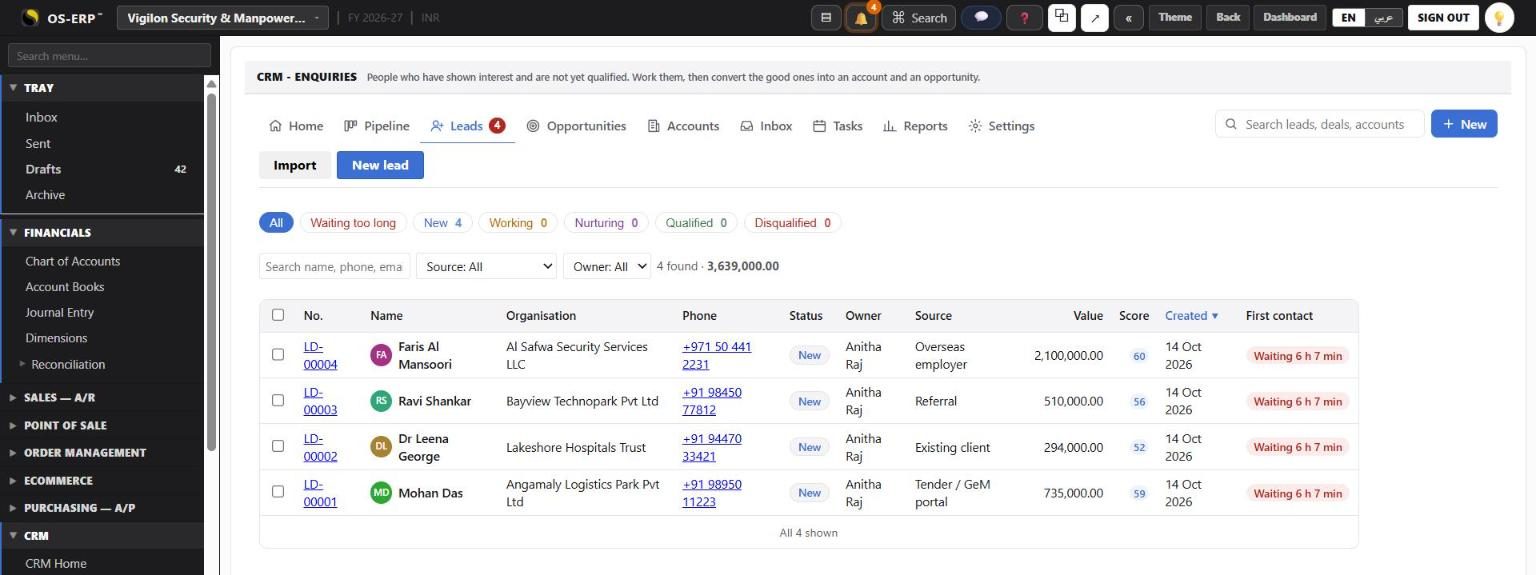
| Lead | From | What they want |
|---|---|---|
| LD-00001 | Angamaly Logistics Park (tender) | Guards for a new warehouse park |
| LD-00002 | Lakeshore Hospitals Trust (existing client) | More posts at a second campus |
| LD-00003 | Bayview Technopark (referral) | A full security contract |
| LD-00004 | Al Safwa Security Services, UAE | 60 security guards for Abu Dhabi malls |
3.3 Messages are sent from inside OSCRM
Every WhatsApp, SMS and Email button on a lead, an account or a candidate opens a compose sheet inside OSCRM. It no longer opens WhatsApp Web or the mail program. The message is kept on the person's timeline and in the shared inbox, so anyone picking the lead up next sees what was said.
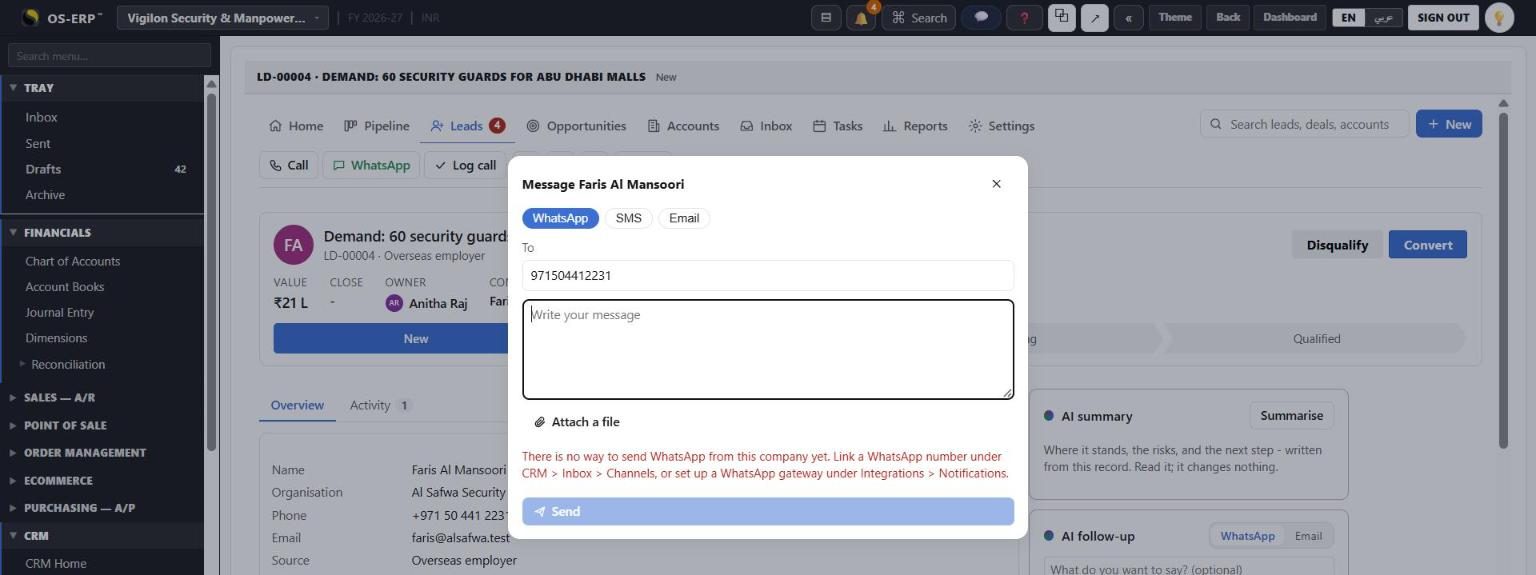
The sheet picks the way to send for each channel:
- WhatsApp through a linked WhatsApp number (CRM > Inbox > Channels) or the company's WhatsApp gateway (Integrations > Notifications).
- SMS through the company's SMS gateway.
- Email through a connected mailbox or the company's email gateway.
When there is no way to send yet, the sheet says so and names the setting, as it does above. Nothing pretends to have been sent. A message a channel refuses stays in the thread as failed, with the reason and a Send again button.
The AI follow-up drafts a message from the lead's history. It now has a Review and send button that opens the same sheet with the draft in it. The AI never sends anything itself.
Registration links to new clients (Business Partners) go the same way: Send by WhatsApp and Send by SMS send the link through the company's gateway.