
Appearance
4. Budget, subcontract orders and the early warning
Back to the case study · Previous: 3. The agreement
The client has signed. Now the company commits money: it releases the project, sets its tender budget, and places orders with its subcontractors. This is the moment most studios lose their margin without noticing. In OSERP it is the moment the loss becomes visible.
4.1 Release the project
On the Overview tab, Move to Released opens the project for cost. From now on supplier bills, timesheets and expenses can be posted to its tasks. The status network is:
Draft -> Released -> Technically complete -> Closed
Each step can be stepped back while nothing prevents it (for example Move to Draft before any cost is posted).
4.2 The tender budget (Budget tab)
The quantity surveyor's tender budget was entered task by task with Add budget:
| Task | Budget |
|---|---|
| Concept, 3D visuals and detailed design | 65,000 |
| Site set-up, protection and supervision | 60,000 |
| Gypsum ceilings and partitions | 290,000 |
| Marble and timber flooring | 430,000 |
| Kitchen, wardrobes and wall panelling | 320,000 |
| Lighting, controls and electrical | 115,000 |
| Painting and decorative finishes | 70,000 |
| Total | 1,350,000 |
Against a contract of 1,850,000, that is a planned profit of AED 500,000 (27.0%).
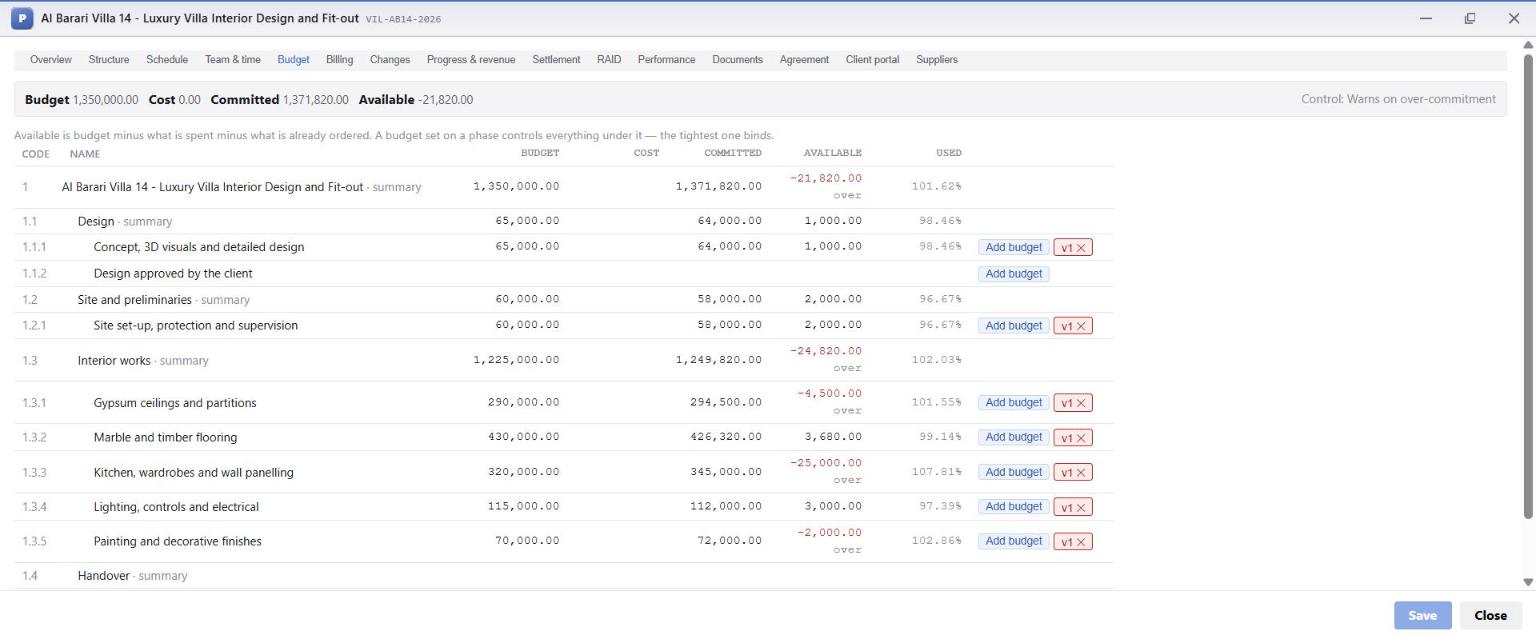
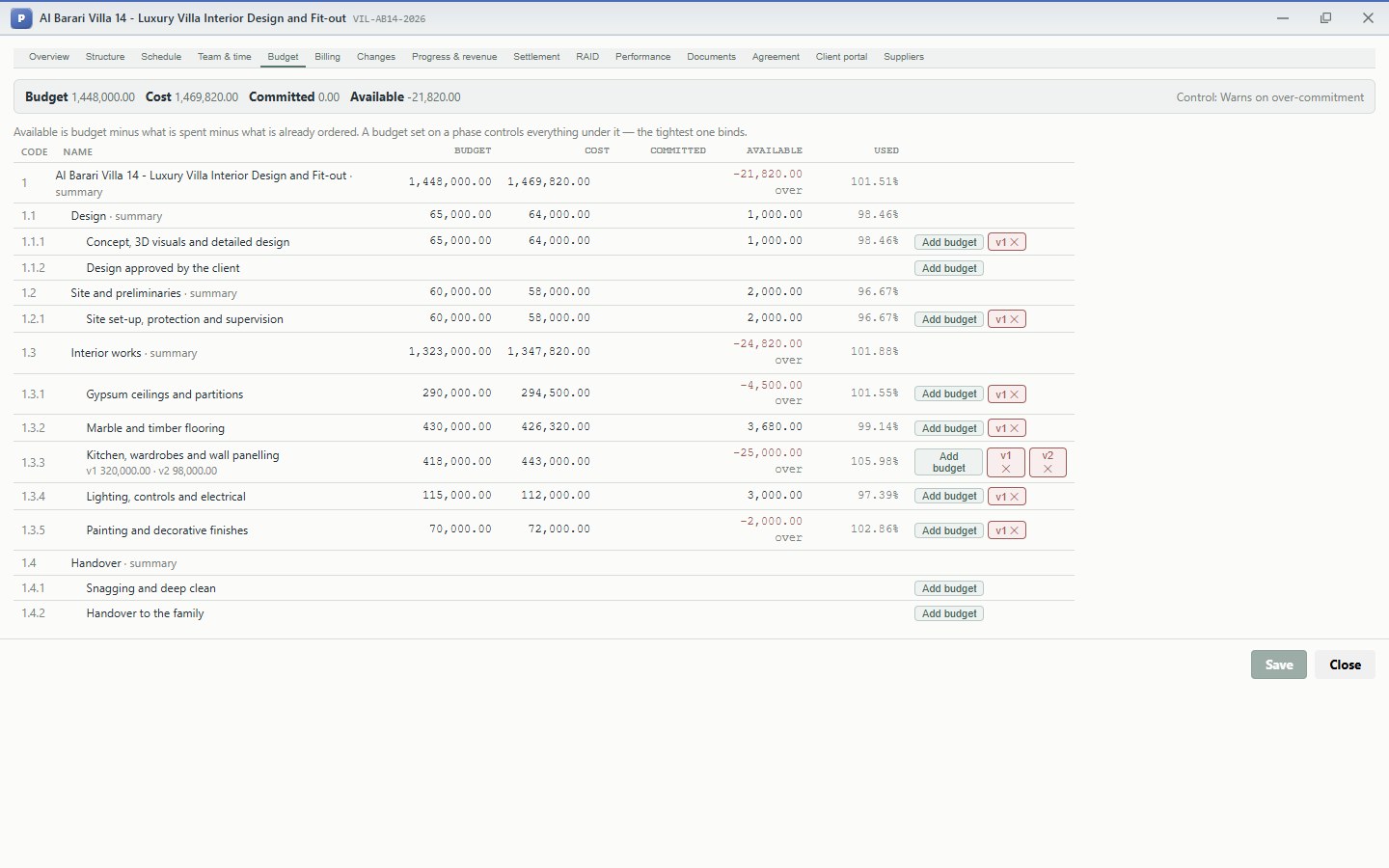
Each budget line is a version (v1 on the screen). A later change adds v2 on top rather than overwriting v1, so the original tender budget is never lost. The top right shows the project type's budget control: Warns on over-commitment on this project. A company can choose instead to block orders that exceed the budget.
4.3 Place the subcontract orders
Each subcontract is a purchase document of type Service, tagged to the project and to its task, with 5% retention for the trades:
| Order | Subcontractor | Work | Net amount | Retention |
|---|---|---|---|---|
| PO-2026-00037 | Studio Linea Design Consultants | 3D visualisation, lighting design, BOQ support | 64,000 | - |
| PO-2026-00038 | SiteServe Logistics LLC | Floor protection, debris removal, final clean | 58,000 | - |
| PO-2026-00039 | Al Noor Gypsum & Ceilings LLC | Ceilings with cove troughs, partitions | 294,500 | 5% |
| PO-2026-00040 | Emirates Flooring Contracting LLC | Calacatta marble 4,600 sq ft, engineered oak 3,600 sq ft | 426,320 | 5% |
| PO-2026-00041 | Gulf Joinery Industries LLC | Kitchen and island, 7 wardrobes, walnut panelling | 345,000 | 5% |
| PO-2026-00042 | Bright Line Electromechanical LLC | Lighting fixtures, scene controls, power changes | 112,000 | 5% |
| PO-2026-00043 | Colourcraft Painting Services LLC | Emulsion, lacquer and Venetian plaster | 72,000 | 5% |
The lines carry quantities and rates (square feet for gypsum and flooring, numbers of wardrobes). That matters later: subcontractors claim and are certified by quantity, so nobody can bill more than was ordered.
4.4 The early warning
The moment each order was placed, it appeared on the Budget tab as Committed. This is what the quantity surveyor saw on 15 April, before a single dirham had been spent:
| Column | Meaning |
|---|---|
| Budget | What the tender allowed |
| Cost | What has actually been posted (bills, time, expenses) |
| Committed | What has been ordered and not yet billed, before VAT |
| Available | Budget minus cost minus committed. Red and marked over when negative |
| Used | (Cost + committed) as a share of budget |
The joinery came in at 345,000 against a budget of 320,000: AED 25,000 over (107.8%). Gypsum was 4,500 over and painting 2,000 over. Design, site, flooring and electrical came in under. The project as a whole was committed AED 21,820 above its tender budget, which would have taken the profit from 500,000 down to 478,180.
This is the moment that decides the margin
Without a commitment line, the joinery overrun shows up in August, when the last joinery bill arrives and the job is nearly over. In OSERP it showed up on the day the order was placed, with five months left to recover it. The RAID log already had the response (chapter 2): value-engineer where possible, and price every client upgrade as a variation. Chapter 7 shows that response paying for the overrun more than twice over.
Commitments are recorded before VAT, like the budget and the cost, because the company recovers the VAT on its purchases. When a subcontractor's bill is posted, the commitment it settles is released and the cost takes its place, so nothing is counted twice. At the end of the job, every order shows committed 0.00 and its whole value as cost.
4.5 The subcontractors' accounts (Suppliers tab)
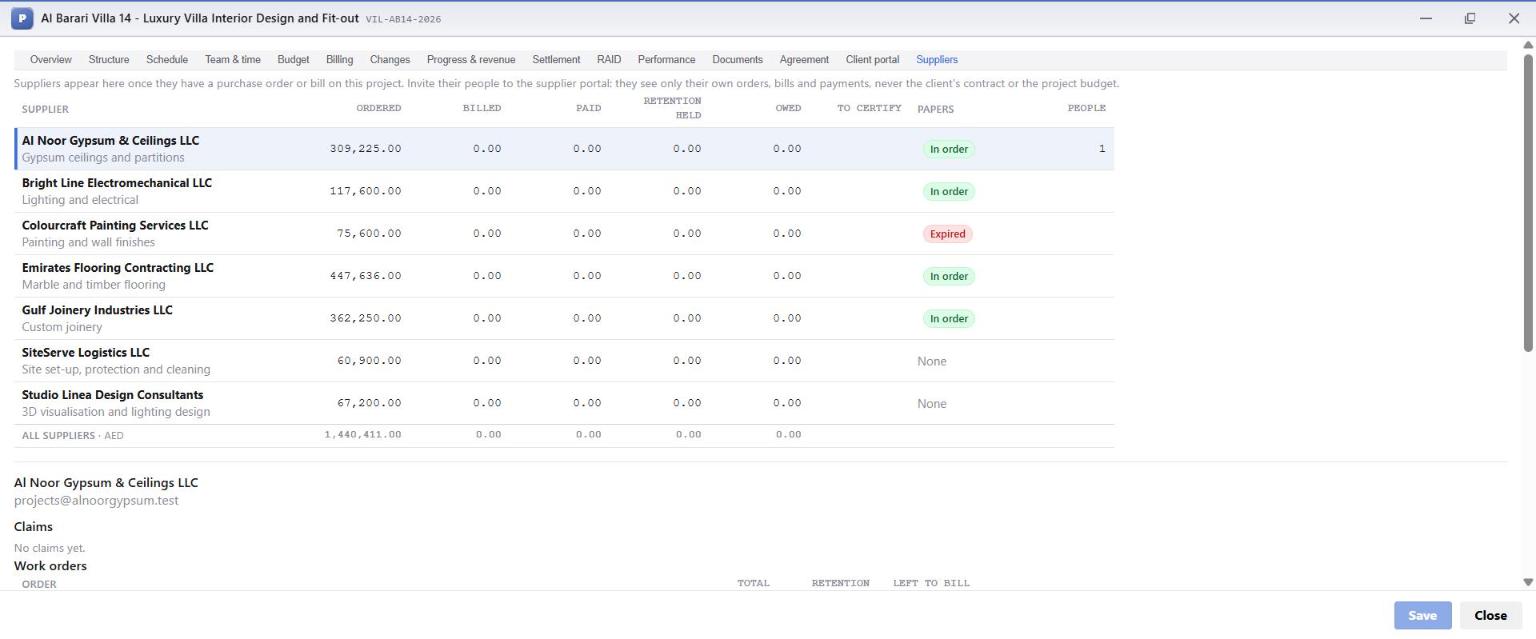
The Suppliers tab lists every supplier with an order or a bill on the project, with their running account:
| Column | Meaning |
|---|---|
| Ordered | Total of their work orders, with VAT |
| Billed / Paid | What they have billed and what has been paid to them |
| Retention held | What the company has kept back from their bills, payable at the end of the defects period |
| Owed | Billed and not yet paid |
| To certify | Claims they have made that are waiting for the company's decision |
| Papers | Whether their compliance papers are In order, Expired or missing (None) |
| People | How many of their people have access to the subcontractor portal |
Compliance papers
Each subcontractor's trade licence and insurance are filed against them with a reference and an expiry date, and accepted by the company. They are kept per supplier, so they carry over to every project.
On this project Colourcraft's contractor's-all-risks insurance expired on 31 July 2026. OSERP marks the supplier Expired, and says so on the supplier's page:
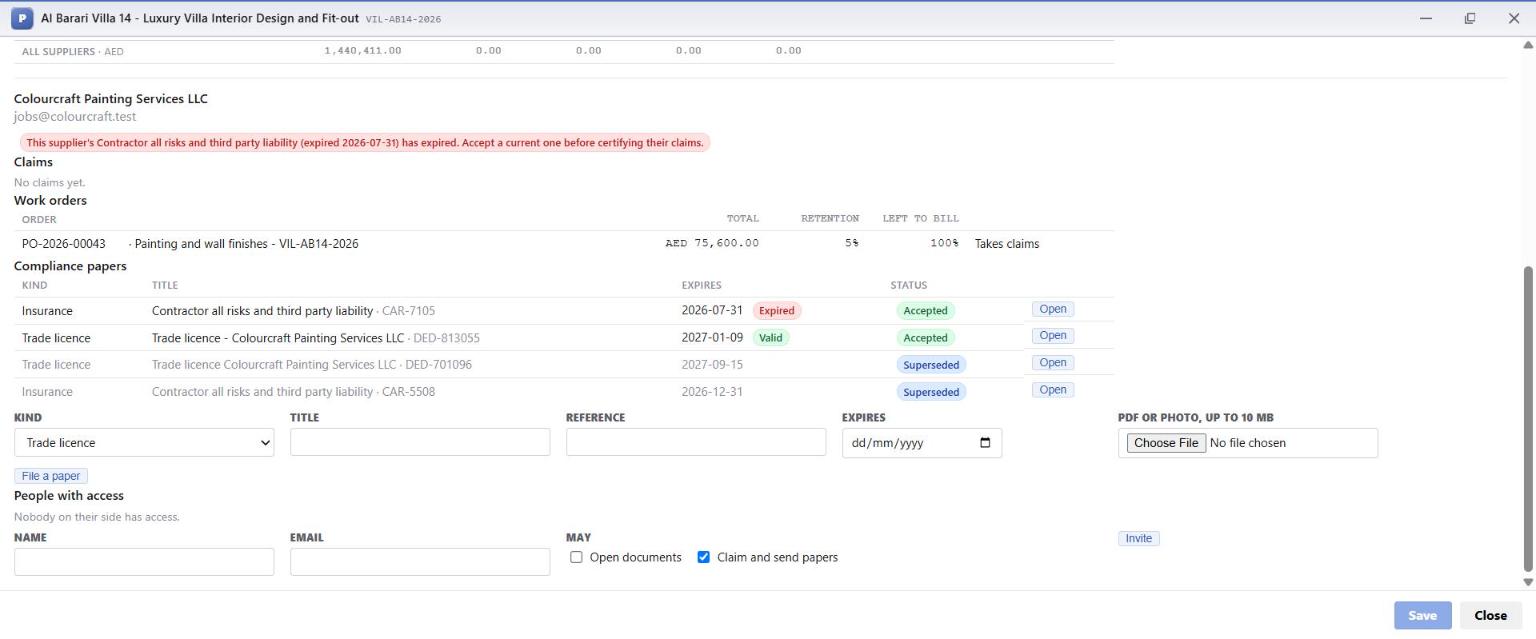
This supplier's Contractor all risks and third party liability (expired 2026-07-31) has expired. Accept a current one before certifying their claims.
Until a current certificate is filed and accepted, no claim from this supplier can be certified. A claim made through the portal cannot become a bill while the subcontractor is working uninsured in a client's home.
What the check does not cover
The block applies to claims certified on the Suppliers tab. A supplier bill that accounts enters directly against the work order is not stopped by an expired paper. On this project Colourcraft did not use the portal and was billed directly, which is why the final Suppliers tab still shows them Expired with their work billed. If you want the check to hold for every trade, have every subcontractor claim through the portal, or make the Papers column part of your payment run: an Expired badge means chase the renewal before you pay.
4.6 Invite subcontractors to their own portal
At the bottom of each supplier's page, under People with access, the company invites the subcontractor's people, choosing what each may do: Open documents and Claim and send papers. Marina Fit-Out invited Faisal Rahim, the quantity surveyor at Al Noor Gypsum, and Rohit Varma, the site lead at Emirates Flooring.
Rohit accepted his invitation on the same website the client uses, and landed on his own page for the project:
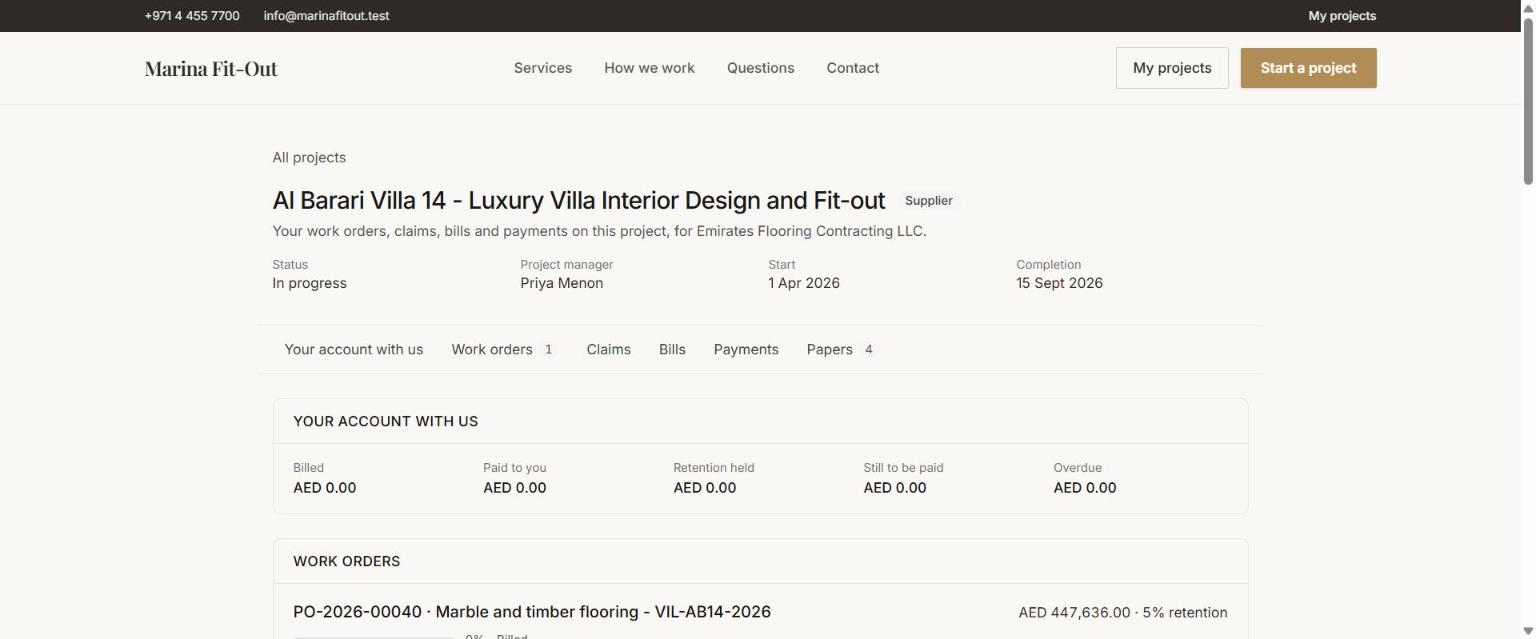
He sees only his own company's work: Your account with us (billed, paid, retention held, still to be paid, overdue), his work orders with their lines and how much of each is left to bill, his claims, bills, payments and papers. He never sees the client's contract, the project budget, or any other subcontractor.
What this chapter means for the business
- An overrun of AED 21,820 was visible on day one of ordering, not on the last bill. That is the difference between recovering it and absorbing it.
- The original budget is never overwritten. Version 1 stays, so the company always knows how its tender compared with reality, and can tender the next job better.
- Compliance is visible and, for claims, enforced. An expired insurance certificate stops certification automatically, and the Papers column flags it everywhere else.
- Subcontractors serve themselves. Their questions (what have you paid me, what are you holding, what is left on my order) are answered on the portal instead of by phone.