
Appearance
Case study: implementing OSERP, an online shop and apps for a South African wine estate
This case study follows one ERP implementation from the first proposal to the last invoice. An implementation partner in India delivers OSERP, an OSCom online shop and Android and iOS shop apps to a wine and brandy estate in South Africa. The partner runs the whole engagement in its own OSERP company, using the Projects module. Every screenshot was taken from a working OSERP system as the project moved through its stages. Nothing is a mock-up.
Use it two ways:
- As a model for your own implementation projects. It shows how to price one, what to enter on which screen, how hours and purchases become project cost, how milestone invoices are raised, and how the margin is watched every month.
- As a delivery checklist. Chapter 6 is the configuration workbook the consultants worked through in the client's own OSERP, OSCom shop and apps.
The two companies
| Implementation partner | Nimbus ERP Consulting Pvt Ltd, Infopark, Kochi, India. Books in Indian rupees (INR), GST-registered in Kerala. |
| Client | Klipvallei Wine Estates (Pty) Ltd, Stellenbosch, Western Cape, South Africa. A wine and brandy estate with a cellar, a bonded warehouse, a tasting room, a wine club and exports to the UK. |
Both companies, all the people in them and every supplier are fictional. The third-party services named (PayFast, Yoco, The Courier Guy, FNB, Standard Bank, Sage Pastel, SARS) are real South African services that an implementation like this connects to. They are named only as integration targets.
Why this industry is hard
A wine estate puts almost every part of an ERP to work at once, and adds rules of its own:
- Production in stages. Grapes become juice, wine, blends and bottled stock, each tracked by vintage and lot.
- Excise and a bonded warehouse. Duty is due when wine or brandy leaves bond, at different rates for each.
- Three sales channels. A tasting-room till, an online shop with a wine club, and export orders from a UK importer.
- Liquor law. No sale to anyone under 18, so the age is checked at sign-up, at checkout and again at delivery. The liquor licence is shown on the site.
- South African conditions. VAT at 15%, POPIA consent for personal data, and load-shedding: scheduled power cuts during which the till must keep selling.
That is why this project carries customization and third-party integrations on top of a standard implementation, and why they are priced separately.
The project
| Project | Klipvallei Wine Estates - OSERP, online shop and apps implementation (code KLV-ERP-2026) |
| Type | IT / software implementation (billed by milestone) |
| Contract | INR 17,00,000, fixed price, export of services under LUT (no GST) |
| Programme | 4 May to 30 September 2026; go-live 1 September; 30 days of hypercare |
| Team | A project manager, four consultants and a UI/UX consultant |
| Suppliers | An iOS release subcontractor, a security-testing firm, a messaging provider and a travel agency |
How the INR 17,00,000 is made up
| Part | What it covers | INR |
|---|---|---|
| A. Standard implementation | OSERP ERP set-up and training, cellar and production, the OSCom shop, the Android and iOS apps, data migration from Sage Pastel, go-live and 30 days of hypercare | 8,00,000 |
| B. Customization | South African VAT and the VAT201 report; excise and the bonded warehouse; age verification; the wine club and the UI/UX design to the estate's brand; push messages and a till that keeps selling through power cuts | 5,50,000 |
| C. Third-party integrations | PayFast and Yoco payments; The Courier Guy shipping; FNB and Standard Bank statements; WhatsApp and SMS; the UK importer's order feed | 3,50,000 |
| Contract | 17,00,000 |
Customization is priced higher per unit of effort than the standard work, for three reasons. It is built once for one client. It is tested against rules the partner does not own, such as SARS excise or Apple's review guidelines. And it must be kept working after go-live. Chapter 1 shows the build-up.
The result
| Planned at signing | Final | |
|---|---|---|
| Contract value | 17,00,000 | 18,50,000 (with change order CO-001) |
| Cost | 12,10,000 | 12,96,700 |
| Profit | 4,90,000 | 5,53,300 |
| Margin | 28.8% | 29.9% |
| Go-live | 1 September | 1 September |
| Hours | 1,020 | 1,126 |
| Client paid by 14 October | 15,30,000 (two invoices of 3,20,000 still due) |
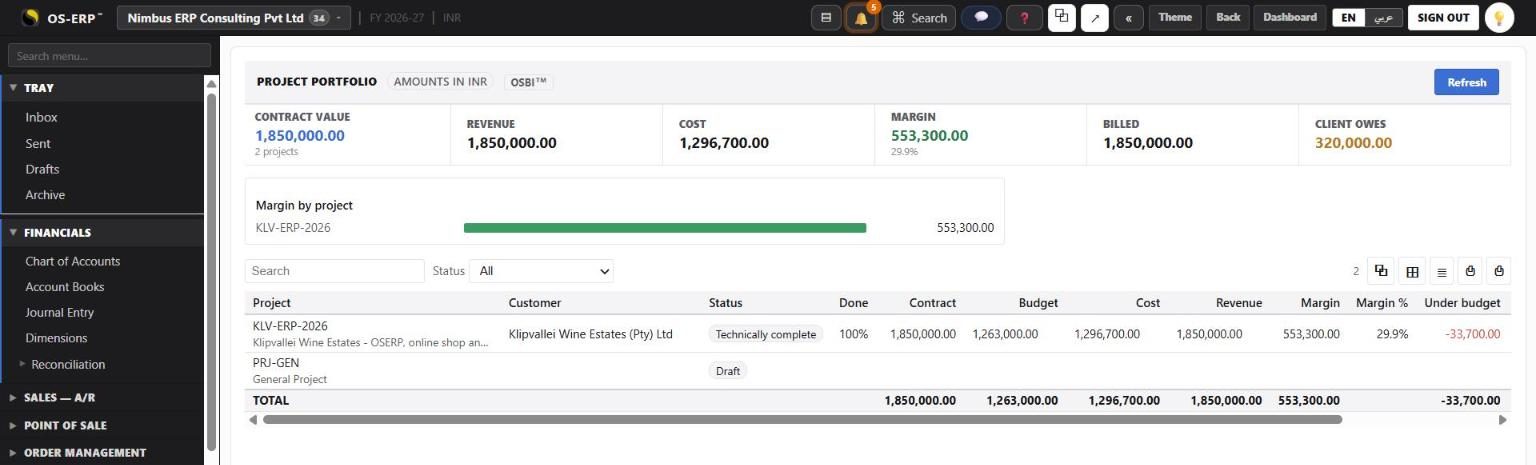
Three things went over plan: the courier changed its API in the middle of the build, the UK importer's feed needed a second round, and Apple rejected the first iOS submission. Together they cost INR 41,700 of extra hours, and the Budget tab showed each one in the month it happened. The client then asked for wine club subscriptions in the apps. The team priced the request as a change order and had it approved before starting the work. It added INR 97,000 of margin, more than twice the overrun.
How to read this case study
Each chapter is one stage of the engagement. The chapters show the screens in the order the team used them, list what was entered in each field and why, and end with what it meant for the partner's money. Read them in order the first time; afterwards use them as a reference for your own projects.
Chapters
- The deal: scope, team and price - how the partner sized the work, costed the team and built the INR 17,00,000 price.
- Setting up the partner's company - the company, the client and suppliers, the six people and the client portal.
- Planning the project - the project header, the work plan (WBS), the schedule, the team and their rates, risks and documents.
- The agreement and the billing plan - scope in three parts, exclusions, the payment schedule, acceptance and the advance invoice.
- Budget, timesheets and purchases - the cost budget, hours turned into project cost, and purchase orders through to supplier payment.
- Delivering the build: the configuration workbook - what the consultants entered in the client's OSERP, OSCom shop and apps, area by area.
- Changes, risks and keeping the client informed - change orders, the RAID log, documents and the client portal.
- Invoicing, revenue, close-out and lessons - milestone invoices and receipts, revenue by progress, earned value, the profit bridge and a checklist.
What you need to follow along
- An OSERP company with the Projects module switched on (Administration > General Settings).
- Employees on People & Payroll > Employees for everyone who books time, so their hours can be costed.
- A website (store) with the Client portal switched on, if you want the client to follow the project online (see Client project portal).
- An email gateway under Integrations > Notifications, so portal invitations reach people.
All amounts are in Indian rupees (INR), written the Indian way (17,00,000 is 1.7 million). The project screens show amounts before tax. Client invoices carry no GST, because they are an export of services under a Letter of Undertaking (LUT). Indian suppliers' bills carry GST at 18%, which the partner claims back as input credit.
Run it yourself
The script scripts/erp-tests/seed-erp-implementation-case-study.ts builds this project stage by stage on a local OSERP (setup, plan, agreement, accept, release, run, close). Everything that posts goes through the product's own screens' API, so the documents, journals and reports are OSERP's own.