
Appearance
2. Planning the project
Back to the case study · Previous: 1. The company
On 10 March 2026, after the first meeting with the Rahman family, Priya Menon opened the project in OSERP. Everything that follows (cost, revenue, the client's view, the subcontractors' orders) hangs on what is set up here.
2.1 Create the project
- Open Projects and choose + New Project.
- Fill in the header and save.
| Field | Entered | Why it matters |
|---|---|---|
| Code | VIL-AB14-2026 | Every document, journal line and report carries this code. Keep it short and unique. |
| Name | Al Barari Villa 14 - Luxury Villa Interior Design and Fit-out | The name the client sees on the portal. |
| Type | Interior design and fit-out | Brings the trade's wording, the agreement template and the settlement rule (cost of sales). |
| Customer | Rahman Family Office | The portal invites people on the customer's side, and client invoices are raised to this customer. |
| Manager | Priya Menon | Shown to the client as the project manager. Tasks with no owner of their own belong to the manager. |
| Start / End date | 1 Apr 2026 / 15 Sep 2026 | The programme the schedule is built inside. |
| Contract value | left empty | It is filled in from the agreement once the client accepts it (chapter 3). |
| Remarks | Six-bedroom villa, 9,500 sq ft ... | Internal; never shown to the client. |
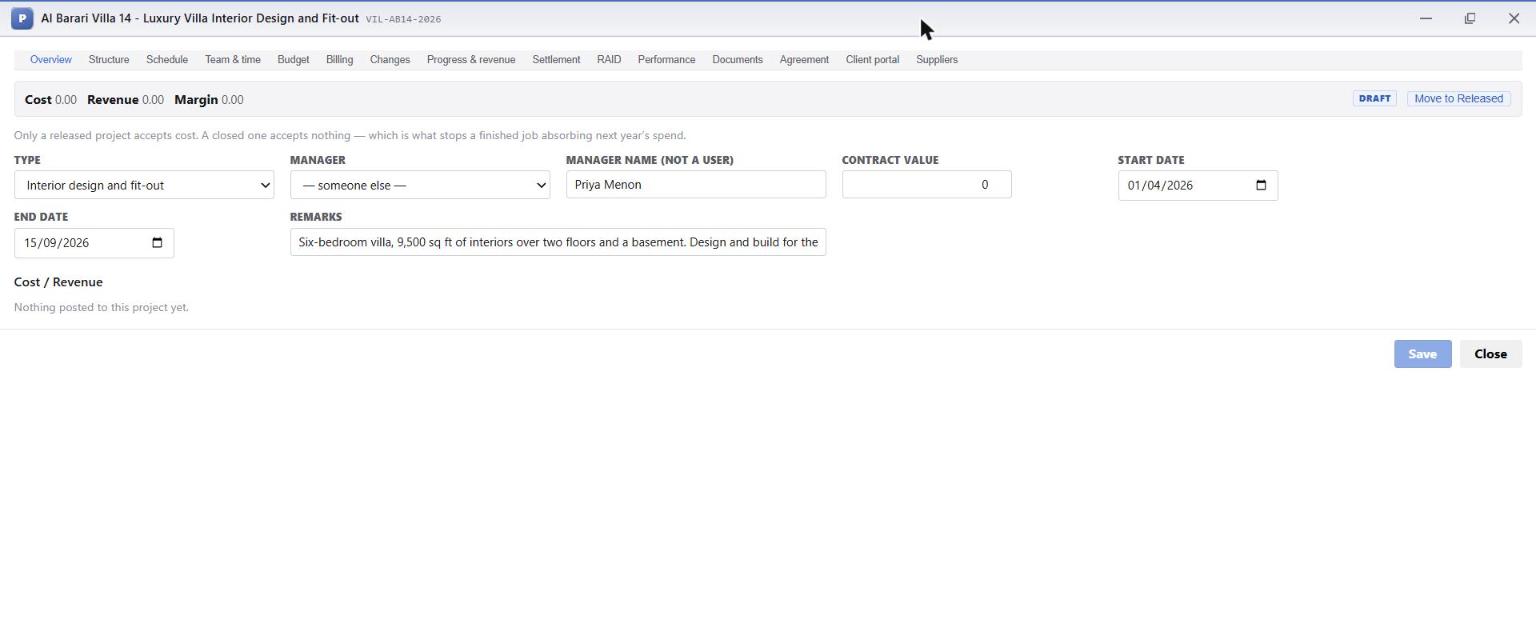
The project opens as a window with fifteen tabs, one for each part of the job. The Overview tab shows the header and, along the top, the job's running Cost, Revenue and Margin. They are zero now, and the project is in Draft.
Why Draft first
A draft project accepts no cost. Nobody can post a supplier bill or a timesheet to it by mistake while it is being planned. You move it to Released once the client has signed (chapter 4). A Closed project accepts nothing at all, which stops a finished job quietly absorbing next year's spending.
2.2 The work breakdown structure (Structure tab)
The Structure tab is the project's work plan: phases, the tasks inside them, and the sign-offs the client approves. It is also how OSERP knows where money goes. Every cost and every budget line sits on a task at the bottom of the tree. A phase only adds up what is below it.
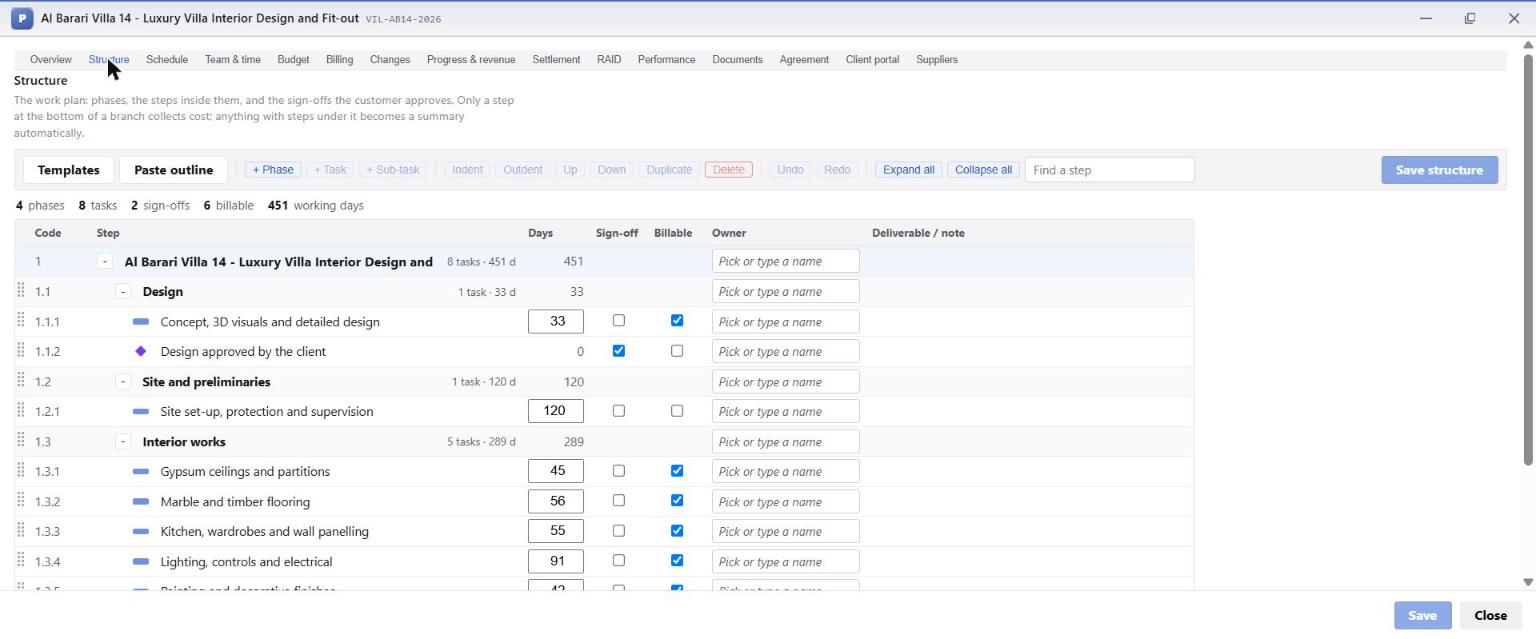
Priya built four phases, eight tasks and two sign-offs:
| Code | Step | Kind | Billable |
|---|---|---|---|
| 1.1 | Design | phase | |
| 1.1.1 | Concept, 3D visuals and detailed design | task | yes |
| 1.1.2 | Design approved by the client | sign-off (diamond) | |
| 1.2 | Site and preliminaries | phase | |
| 1.2.1 | Site set-up, protection and supervision | task | |
| 1.3 | Interior works | phase | |
| 1.3.1 | Gypsum ceilings and partitions | task | yes |
| 1.3.2 | Marble and timber flooring | task | yes |
| 1.3.3 | Kitchen, wardrobes and wall panelling | task | yes |
| 1.3.4 | Lighting, controls and electrical | task | yes |
| 1.3.5 | Painting and decorative finishes | task | yes |
| 1.4 | Handover | phase | |
| 1.4.1 | Snagging and deep clean | task | |
| 1.4.2 | Handover to the family | sign-off |
How the toolbar works:
- + Phase, + Task, + Sub-task add a line at the right level. Indent and Outdent move a line down or up a level.
- Templates starts from a work plan the industry pack supplies; Paste outline turns an indented list (for example from an email or a spreadsheet) into a tree.
- Sign-off marks a step the client approves. It has no duration and collects no cost.
- Billable marks the tasks you invoice against, so billing lines can point to them.
- Owner is the person accountable. Leave it empty and the line above owns it, up to the project manager.
- Save structure saves the whole tree at once. Undo and Redo work until you save.
Plan the tree around how you buy and how you bill
Marina Fit-Out made one task per subcontract trade. When the gypsum subcontractor bills, the cost lands on Gypsum ceilings and partitions, against that trade's own budget line. A tree that mirrors your subcontracts makes every later comparison (budget against order against cost) automatic.
2.3 The schedule (Schedule tab)
The Schedule tab turns the tree into a Gantt chart. For each task Priya set the dates the trade was booked for, and she linked the tasks that depend on each other:
- design must finish before the client's design approval (finish-to-start);
- flooring starts 20 working days after the ceilings start (start-to-start with a lag);
- joinery starts 15 days after flooring starts;
- painting starts 20 days after the ceilings finish;
- snagging finishes before handover.
She then chose Set baseline to freeze the plan, so later slips can be measured against it.
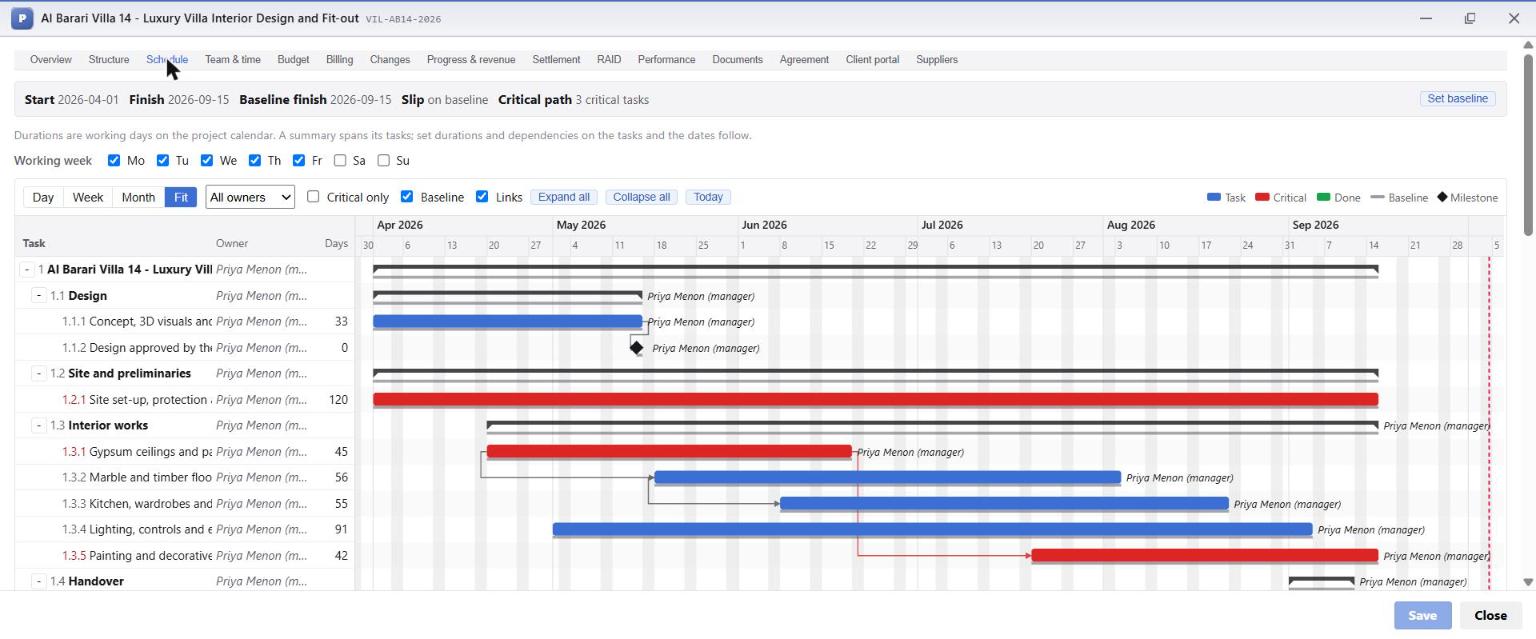
What the screen tells you:
- Start, Finish and Baseline finish along the top, with Slip (how far the finish has moved from the baseline) and the number of tasks on the critical path.
- Red bars are critical: any delay to them delays handover. Blue bars have float (slack).
- Working week sets which days count; this company works Monday to Friday.
- Day / Week / Month / Fit change the zoom; Critical only hides everything else; Today jumps to the current date.
- You can drag a bar to move a task, or drag its right end to change its length.
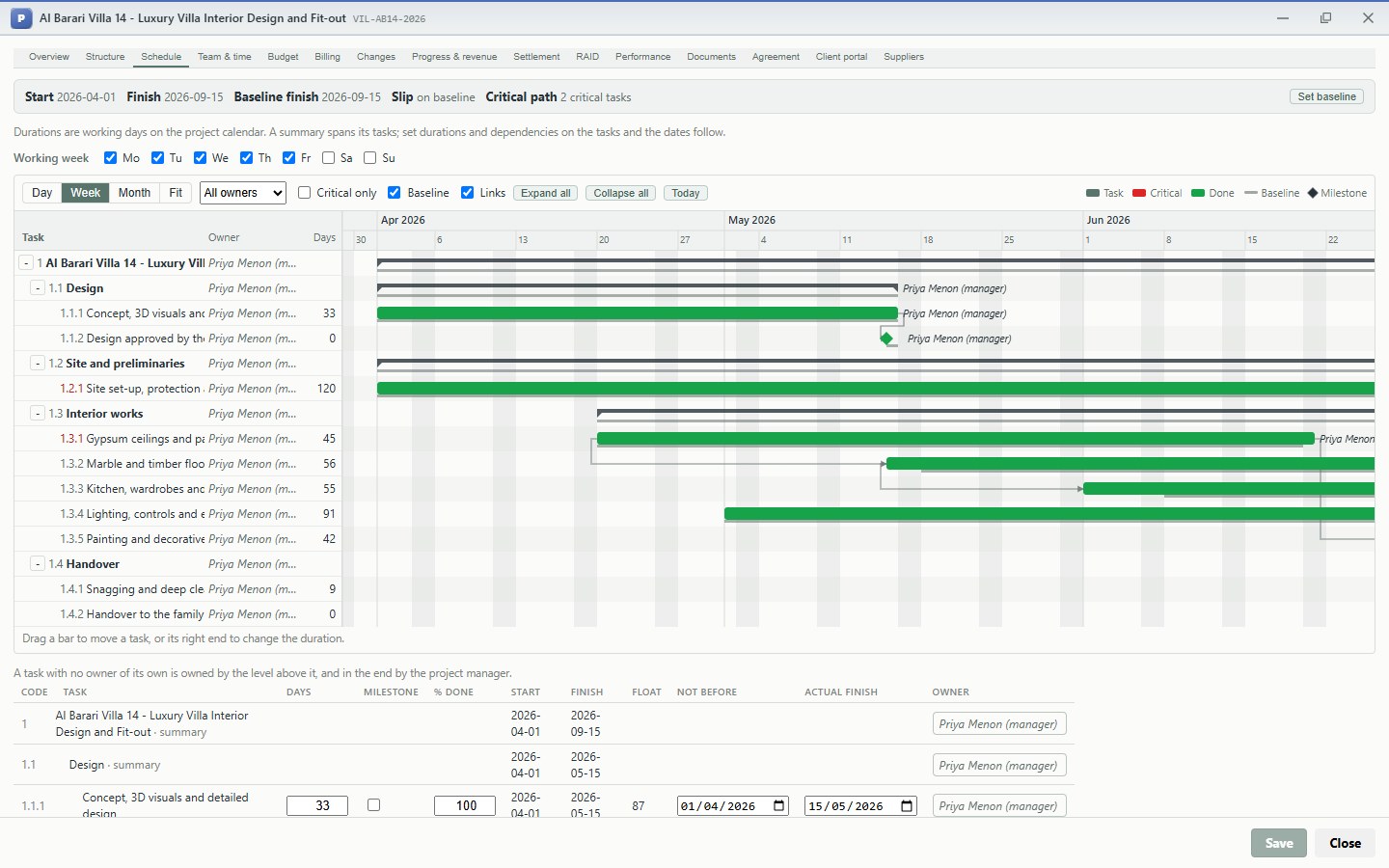
At the end of the job the same screen shows what actually happened: every task green (Done), actual dates against the baseline, and no slip.
2.4 The team (Team & time tab)
The Team & time tab lists who works on the project, with their cost per hour (what an hour of their time costs the company) and bill per hour (what it is charged at, where time is billable), their allocation and dates.
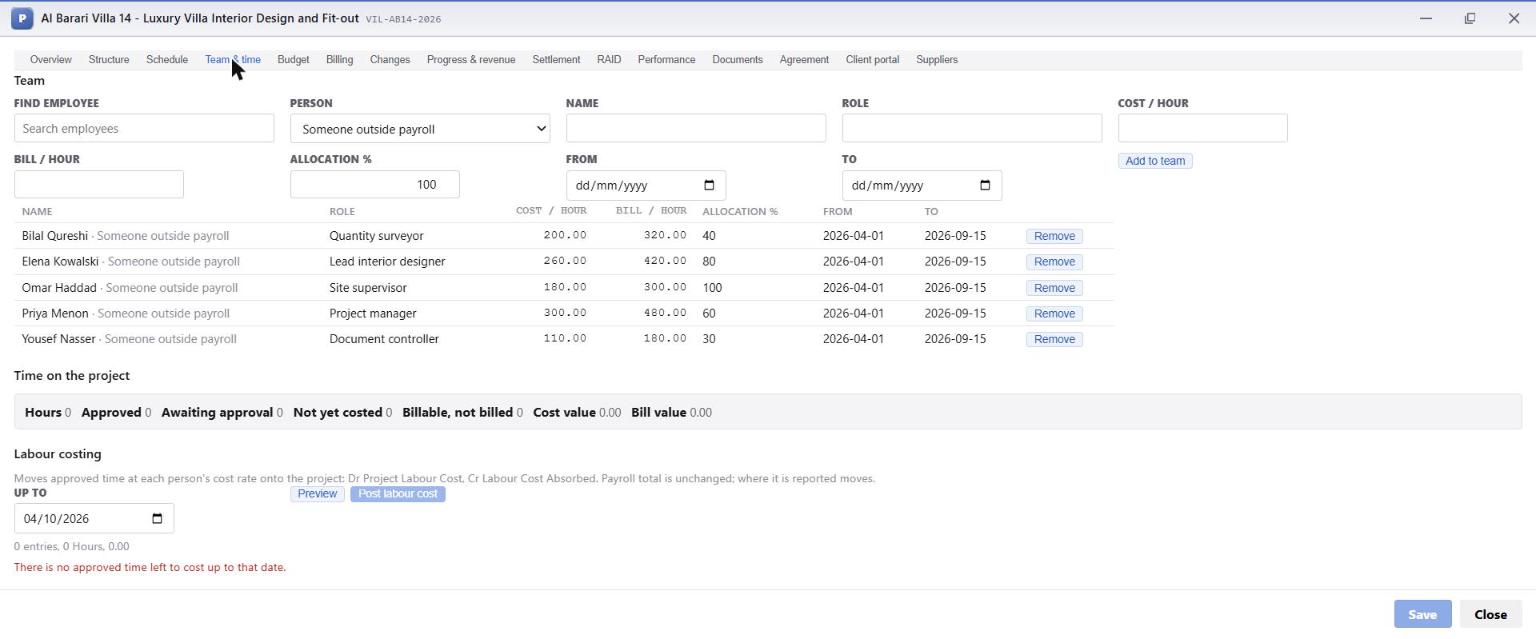
Below the team, Time on the project shows hours booked and approved, and Labour costing moves approved time onto the project at each person's cost rate (Dr Project Labour Cost, Cr Labour Cost Absorbed). On this project the team's time was part of the company's overhead, so no labour cost was posted to the job. A studio that wants each project to carry its designers' time would post it here every month.
2.5 Risks, assumptions and dependencies (RAID tab)
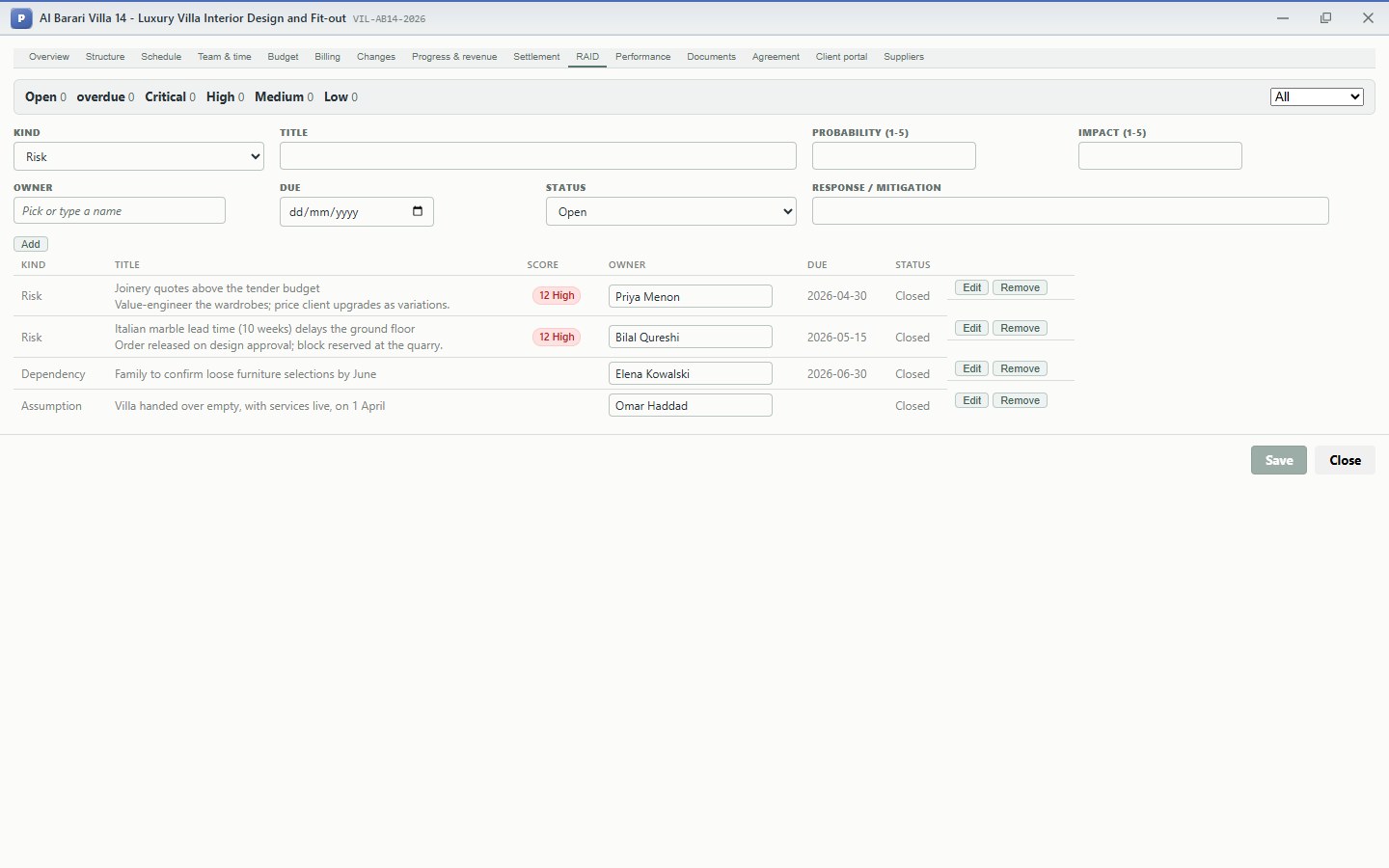
At the start Priya recorded what could hurt the project. Each entry has a kind, an owner, a due date and, for risks, a probability and an impact from 1 to 5 that multiply into a score:
| Kind | Entry | Response |
|---|---|---|
| Risk (score 12, high) | Joinery quotes above the tender budget | Value-engineer the wardrobes; price client upgrades as variations |
| Risk (score 12, high) | Italian marble lead time (10 weeks) delays the ground floor | Order released on design approval; block reserved at the quarry |
| Dependency | Family to confirm loose furniture selections by June | Elena to chase |
| Assumption | Villa handed over empty, with services live, on 1 April | Omar to confirm |
The first risk is the one that came true. Chapter 4 shows OSERP catching it, and chapter 7 shows the planned response working. At the end of the job every entry was closed:
2.6 Documents (Documents tab)
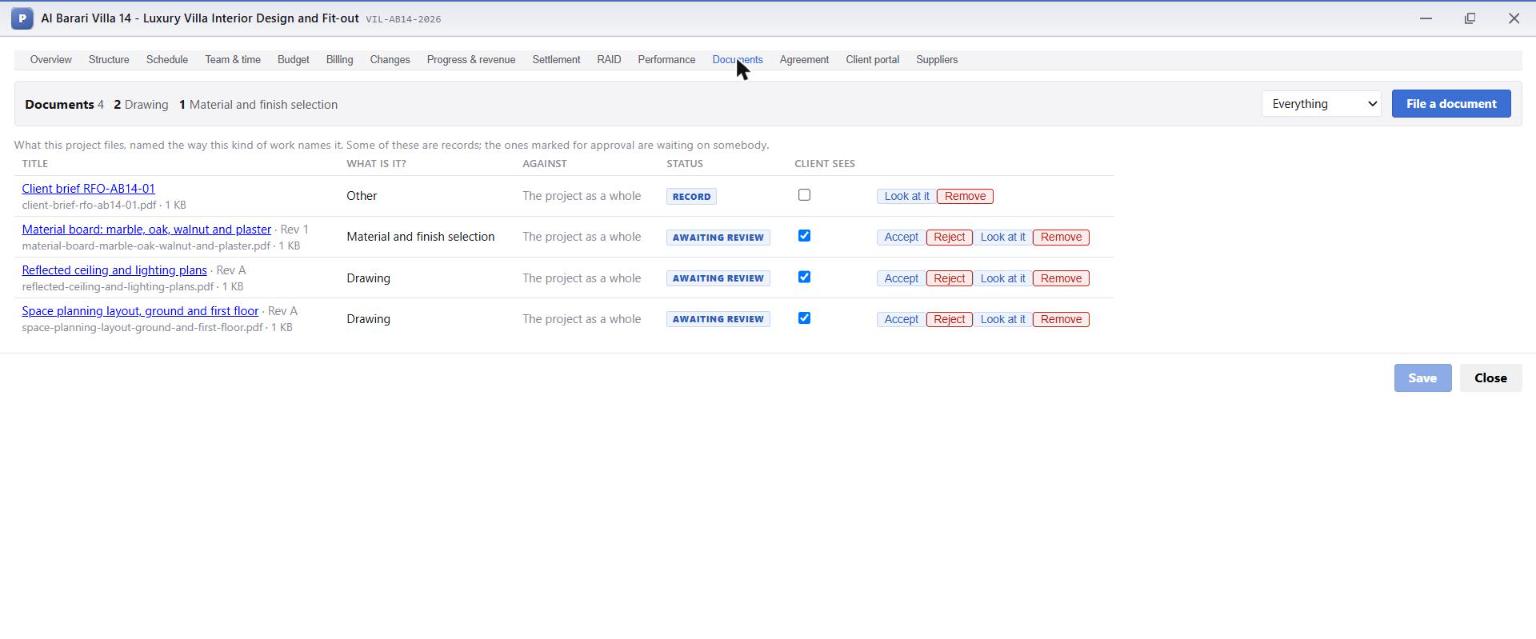
The Documents tab files everything about the project, named the way the trade names it. Priya filed the client's brief and the first drawings, and ticked Client sees on the drawings and the material board. The client's brief stayed internal.
| Column | Meaning |
|---|---|
| What is it? | The document kind (drawing, material and finish selection, contract, permit, snag list, handover pack ...). |
| Status | Record for reference documents; Awaiting review for documents that need someone's decision. |
| Client sees | Ticked documents appear on the client's portal. Nothing else does. |
| Accept / Reject | The company's own internal review of a document. Client approval is separate (chapter 5). |
What this chapter means for the business
- The tree is the cost structure. Because every subcontract trade has its own task, the budget, the order and the bill for that trade meet in one place, automatically.
- A baseline makes slips visible the day they happen, not at handover.
- Risks are owned and dated. The joinery risk had an owner and a response before a single quote arrived, and that response became AED 67,000 of margin.