
Appearance
4. The agreement and the billing plan
Back to the case study · Previous: 3. Planning the project · Next: 5. Budget, timesheets and purchases
The agreement is where the INR 17,00,000 becomes a list of what is included, what is not, and when each part is paid. OSERP keeps it on the project's Agreement tab rather than in a separate document. When the client accepts it, the payment schedule becomes the project's billing plan. Nobody retypes it.
4.1 Draft the agreement (Agreement tab)
Agreement > New revision opens revision 1 as a draft:
| Field | Entered |
|---|---|
| Title | OSERP, online shop and apps - implementation agreement |
| Introduction | What Nimbus delivers, in two sentences the client's director can read |
| Valid until | (optional) the date the offer lapses |
Scope
Each line has a Kind, an Area, a Description, an optional Specification, and a Qty, Unit and Rate. The Area column carries the three priced parts, so the client reads the price the way it was built:
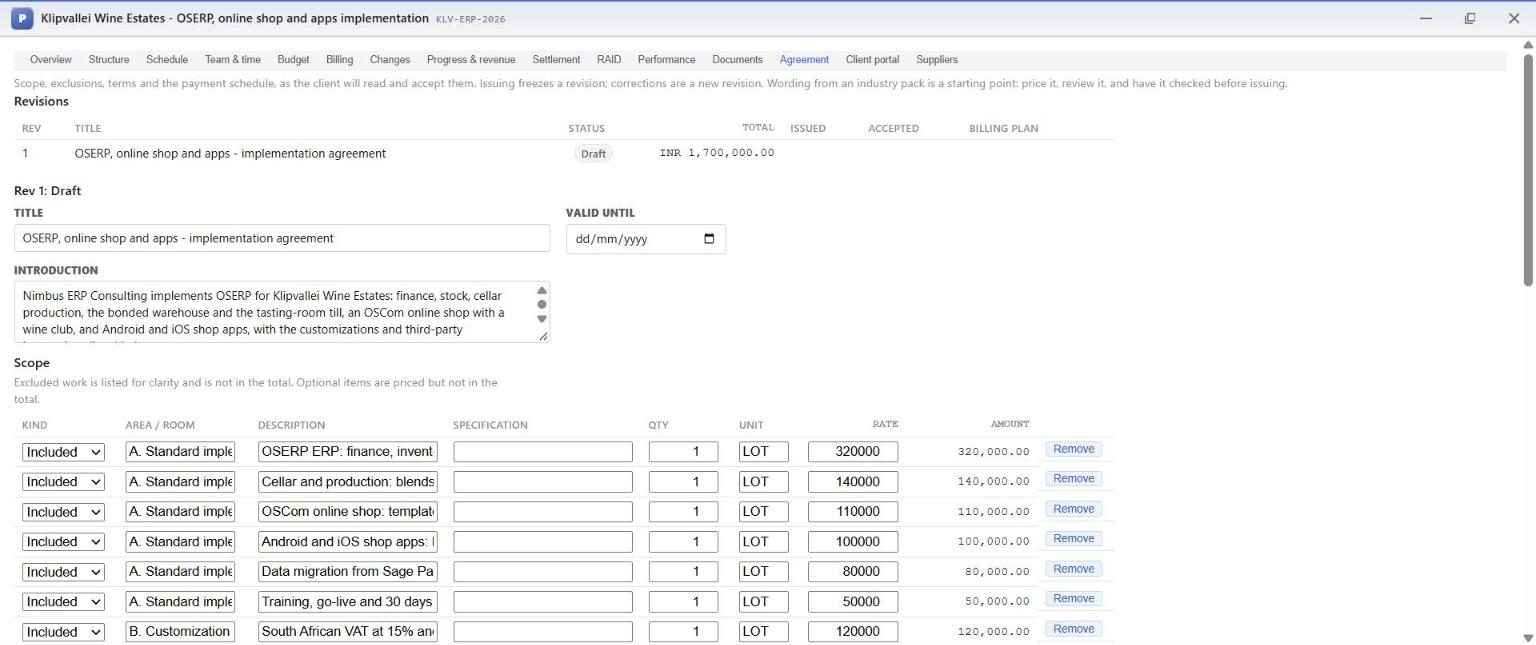
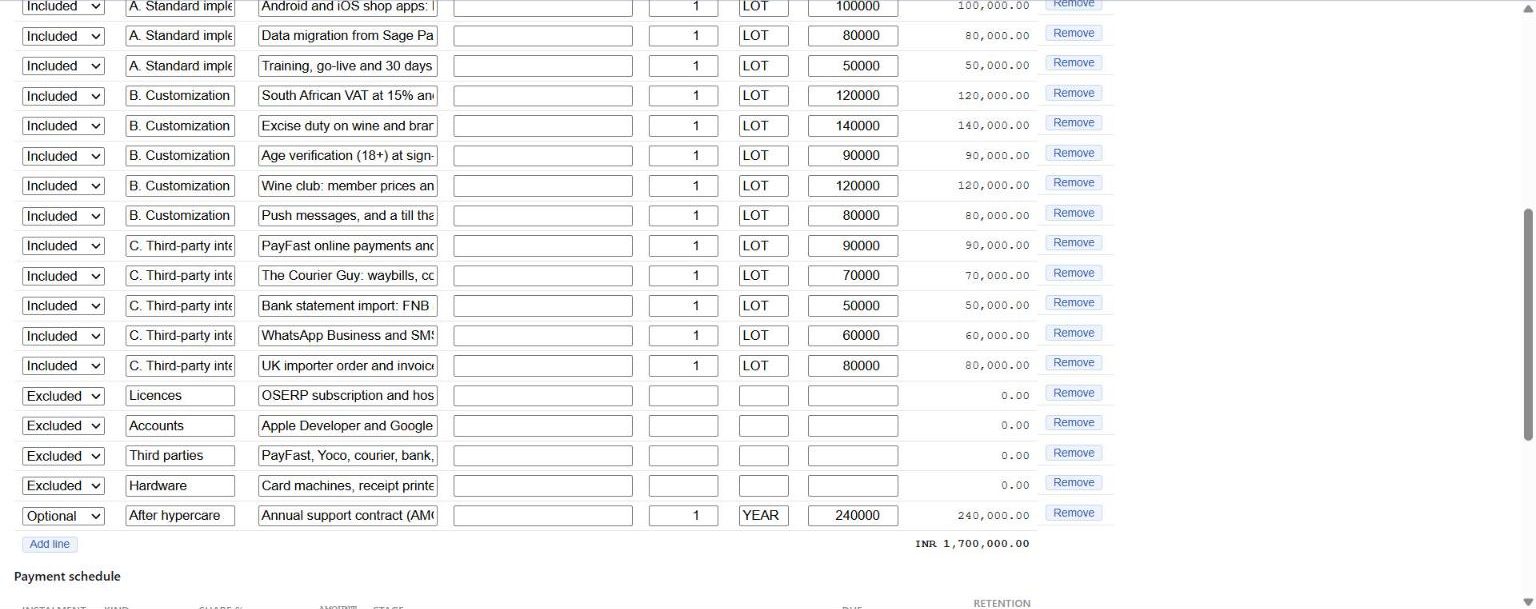
| Area | Lines | INR |
|---|---|---|
| A. Standard implementation | ERP set-up and training 3,20,000; cellar and production 1,40,000; OSCom shop 1,10,000; Android and iOS apps 1,00,000; migration from Sage Pastel 80,000; training, go-live and hypercare 50,000 | 8,00,000 |
| B. Customization | South African VAT and VAT201 1,20,000; excise and the bonded warehouse 1,40,000; age verification 90,000; wine club and UI/UX 1,20,000; push messages and a till that sells through power cuts 80,000 | 5,50,000 |
| C. Third-party integrations | PayFast and Yoco 90,000; The Courier Guy 70,000; bank statements 50,000; WhatsApp and SMS 60,000; UK importer feed 80,000 | 3,50,000 |
| Total | 17,00,000 |
Three other kinds of line keep the scope honest:
- Excluded, listed so nobody assumes otherwise: the OSERP subscription and hosting (billed by OSERP directly); the Apple Developer and Google Play accounts (in the client's own name); PayFast, Yoco, courier, bank, SMS and WhatsApp charges; and hardware such as card machines, printers, scanners and tablets.
- Optional: an annual support contract at 2,40,000 a year. It is priced but not in the total, so the client can take it up later at a known price.
- Allowance (not used here) is a sum the client chooses how to spend.
Put the third-party accounts in the client's name
The App Store and Play Store listings, the payment gateway, the courier account and the WhatsApp number all belong to the client's business. Opened in the partner's name, they become a hostage at the end of the contract. List them as excluded and make them a dependency in the RAID log, with a date.
Payment schedule
Below the scope: one line per instalment, with its Kind (Advance or Milestone), its Share %, the Stage (the sign-off step from the work plan) that earns it, a Due date if you know it, and any Retention %. The shares must add up to 100%, and the green 100% tag confirms it.
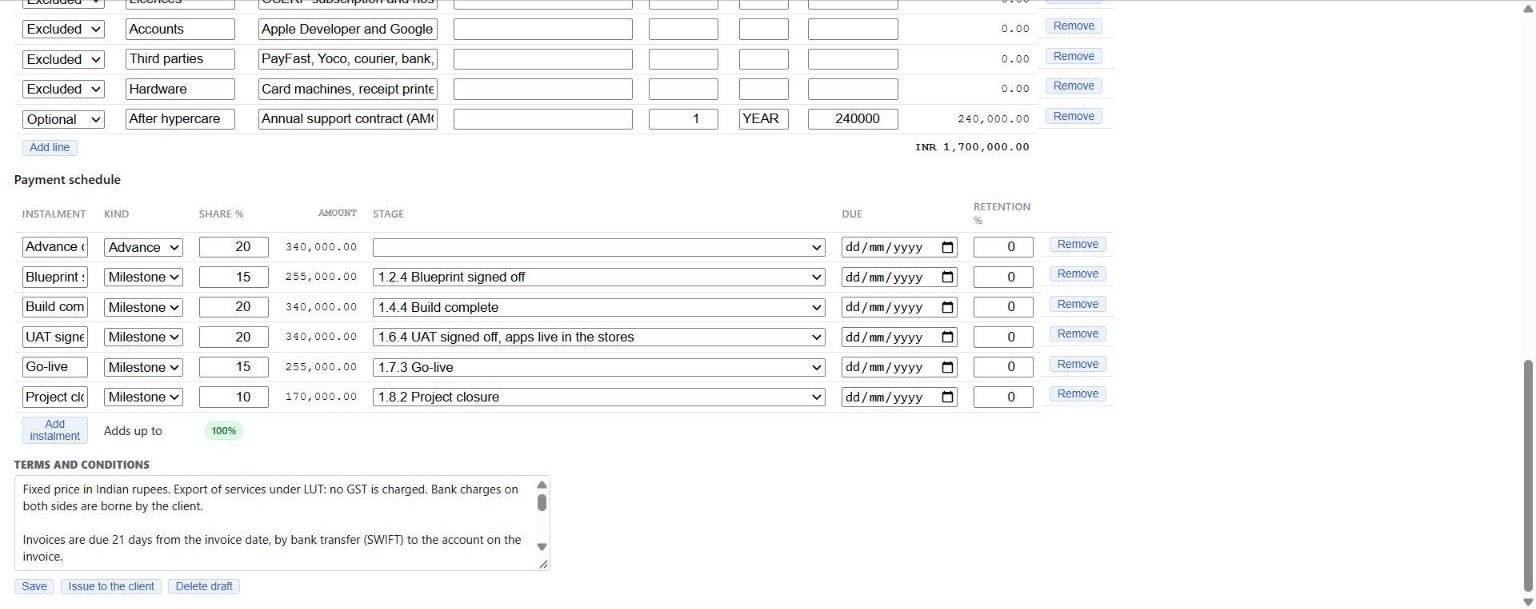
Terms and conditions carry what the screen does not: a fixed price in INR, export of services under LUT with no GST, invoices due in 21 days by SWIFT, changes priced and approved before work, rates for extra work, and third-party fees paid by the client.
4.2 Issue, accept, apply
- Issue to the client freezes revision 1. Corrections after this point are a new revision, so what the client accepted can never change underneath them.
- Acceptance. If the client is on the portal, they accept online and confirm with a code emailed to them; the accepted content is fingerprinted. Klipvallei signed on paper on 27 April, so Meera used Record acceptance with the signer's name and a note: Pieter van der Merwe (Managing Director), signed agreement received by email on 27 April 2026.
- Apply to the billing plan turns the six instalments into six billing lines and sets the project's contract value to 17,00,000.

4.3 Release the project
Overview > Move to Released. A released project accepts cost: hours, purchase orders and bills. Releasing is the moment the work starts being counted, so do it after acceptance, not before.
4.4 The advance invoice
Billing tab > the Advance on signing line:
- Set Tax % to 0, since this is an export under LUT. Lines applied from an agreement carry no tax rate until you give them one.
- Raise invoice. OSERP creates a sales document for Klipvallei, tagged to the project, and sends it through the ordinary sales flow. Approval rules, numbering and the journal all happen there; the Billing tab posts nothing itself.
- In Sales - A/R > Unified Sales Workspace, the document goes on to Invoice (INV-2026-00001, 29 April, INR 3,40,000, tax 0). When the SWIFT transfer arrived on 8 May, it went on to Payment.
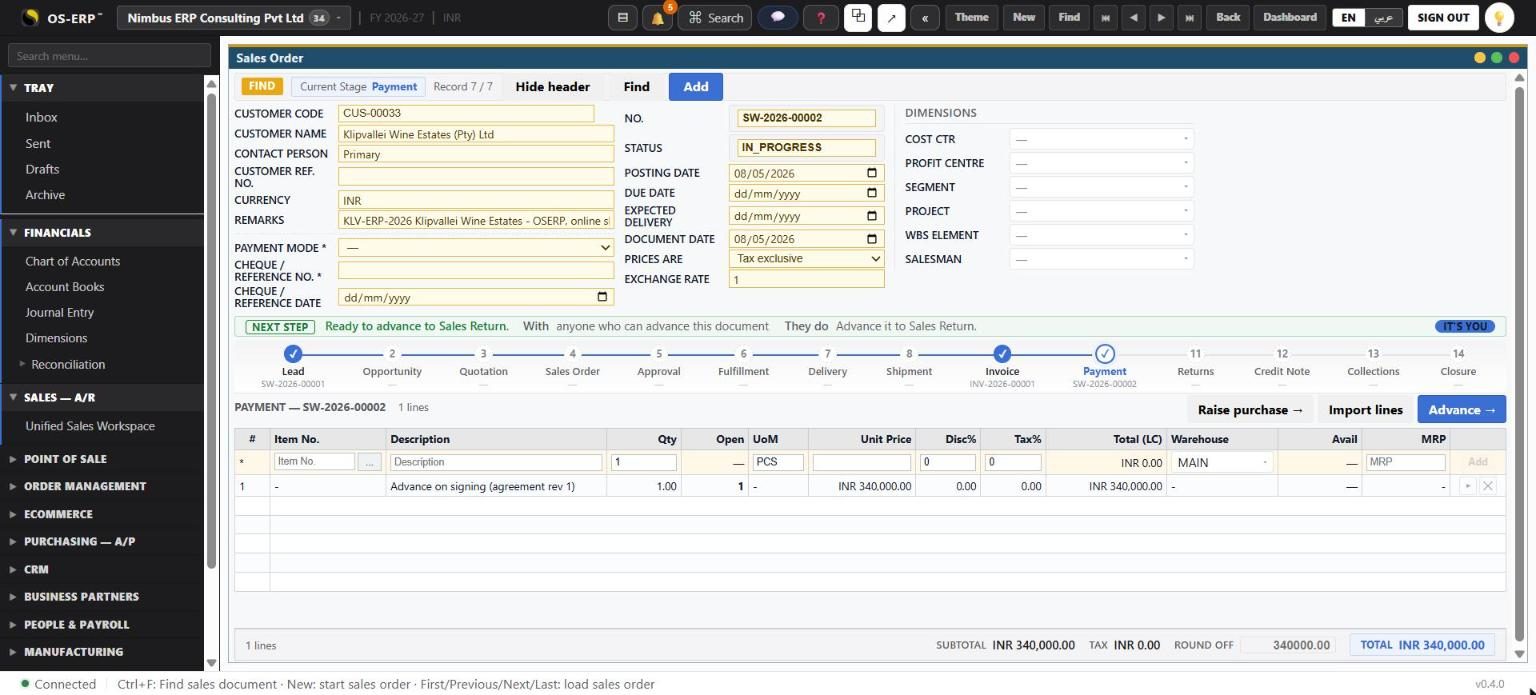
The journal for the invoice is Dr Klipvallei (debtor) / Cr revenue, tagged to the project. Chapter 8 explains why OSERP still measures revenue by progress, not by what was invoiced.
What this chapter meant for the money
The client paid 20% before any consultant had booked an hour. Every later payment is tied to a sign-off the client can see, so there is never a question of whether an instalment is due. The exclusions and the option settle the most common arguments of an implementation project, about who pays for third-party fees and what happens after hypercare, before the work begins.