
Appearance
3. Planning the project
Back to the case study · Previous: 2. Setting up the partner's company · Next: 4. The agreement and the billing plan
On 14 April 2026, with the price agreed in principle, Meera opened the project. Everything after this hangs on the set-up in this chapter: hours, purchases, invoices, revenue and the client's view.
3.1 Create the project
Projects > Projects > + New Project.
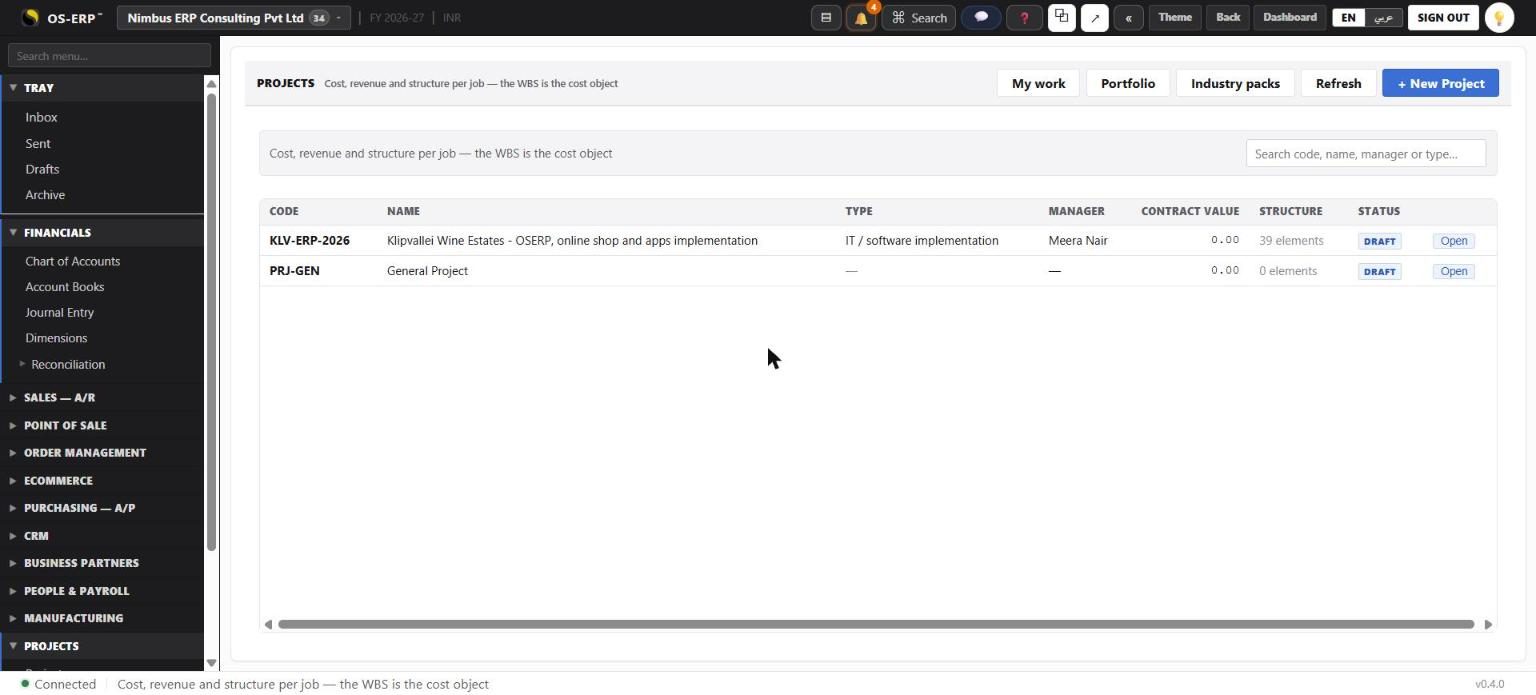
| Field | Entered | Why it matters |
|---|---|---|
| Code | KLV-ERP-2026 | Carried by every timesheet, purchase, invoice and journal line. Short and unique. |
| Name | Klipvallei Wine Estates - OSERP, online shop and apps implementation | The name the client sees in the portal. |
| Type | IT / software implementation | Milestone billing; the document kinds an implementation files (statement of work, requirements, UAT sign-off, go-live sign-off, change request); cost settles to cost of sales. |
| Customer | Klipvallei Wine Estates (Pty) Ltd | Invoices are raised to this customer. Portal invitations go to people on its side. |
| Manager | Meera Nair (picked from users) | Shown to the client. Owns every step that has no owner of its own. |
| Currency | INR | The contract currency. |
| Start / End date | 4 May 2026 / 30 Sep 2026 | The window the schedule is built in. |
| Contract value | left empty | Filled in from the agreement when the client accepts it (chapter 4). |
| Remarks | Wine and brandy estate, Stellenbosch: cellar, bonded warehouse ... | Internal only. |
The project opens in its own window with fifteen tabs. It starts in Draft: a draft project accepts no cost, so nobody can book hours or a bill to it while it is being planned.
3.2 The work plan (Structure tab)
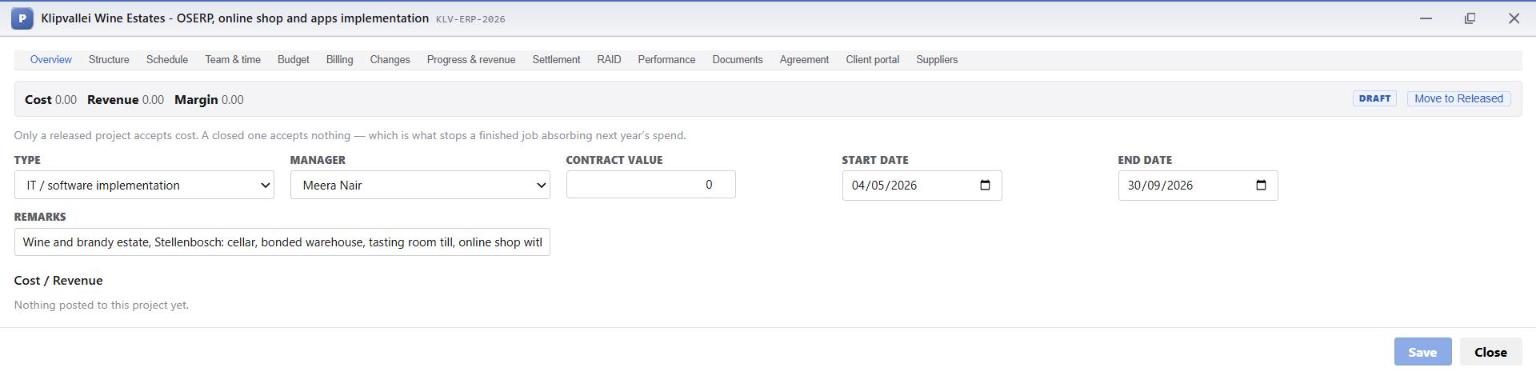
The Structure tab is the work breakdown structure (WBS). OSERP's Templates button offers a Software / ERP implementation plan. Meera started from it and reshaped it around how this project is priced and staffed: one step per item the client pays for, so each priced line has its own cost.
| Code | Phase / step | Kind |
|---|---|---|
| 1.1 | Initiate: Project charter and kick-off; Environments (client OSERP, shop domain, app store accounts) | tasks |
| 1.2 | Discover and design: Process workshops; Fit-gap and customization specifications; UX research, brand kit and app designs; Blueprint signed off | tasks, sign-off |
| 1.3 | Build: ERP: ERP configuration; Cellar and production; Customization: South African VAT 15% and VAT201; Customization: excise duty and bonded warehouse | tasks |
| 1.4 | Build: online shop and apps: OSCom shop; Customization: age verification and wine club; Android and iOS apps; Build complete | tasks, sign-off |
| 1.5 | Integrations: PayFast and Yoco; The Courier Guy; FNB and Standard Bank statements; WhatsApp and SMS; UK importer feed (EDI) | tasks |
| 1.6 | Data migration and testing: Migration from Sage Pastel; System and security testing; User acceptance testing; UAT signed off, apps live in the stores | tasks, sign-off |
| 1.7 | Deploy: End-user training; Cut-over; Go-live | tasks, sign-off |
| 1.8 | Hypercare: Post go-live support, 30 days; Project closure | task, sign-off |
| 1.9 | Project management: Project management and governance (the whole five months) | task |
How the toolbar works:
- + Phase, + Task and + Sub-task add a line at the right level. Indent and Outdent move it.
- Sign-off marks a point the client approves. It has no duration and collects no cost. The five sign-offs here are the five milestone payments.
- Billable marks the steps whose work is charged to the client. Project management is not ticked, because its hours are part of the fixed price.
- Owner is the person accountable. Set it on a phase and every step under it follows: Arjun owns Discover and design, Kavya Build: ERP, Rahul Build: online shop and apps, Sanjay Integrations. Ananya owns the two design steps directly.
- Save structure saves the whole tree. Codes such as 1.4.2 are worked out from the tree's shape, so you never type them.
Only the bottom of the tree collects cost
A timesheet or a bill is always booked to a step at the bottom (1.4.2), never to a phase (1.4). The phase adds up what is below it. That is how the Budget tab can say "Integrations is 34,200 over" and name the step responsible.
3.3 The schedule (Schedule tab)
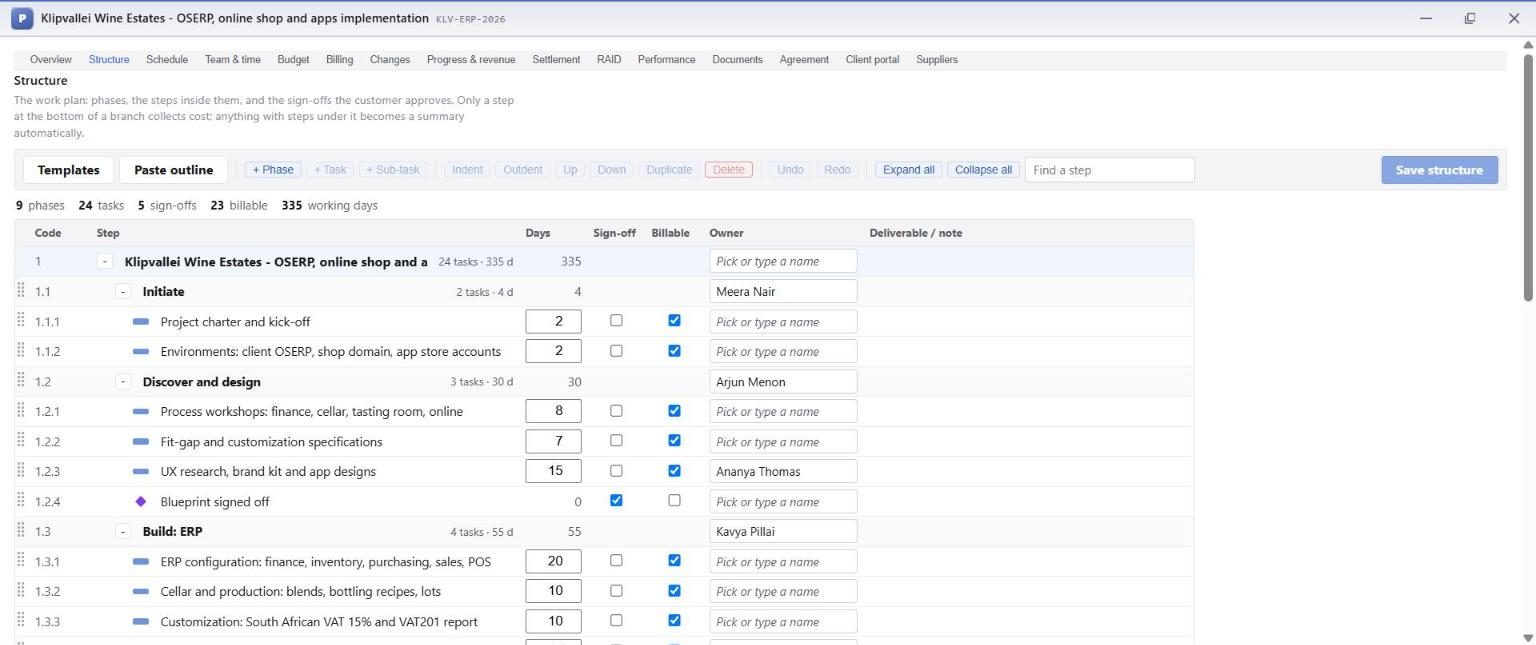
For each step Meera typed the dates it was booked for, then linked the steps that depend on each other:
- workshops, fit-gap and the UX designs all finish before Blueprint signed off;
- ERP configuration, the shop and the VAT customization start only after the blueprint is signed;
- the apps and the excise work must finish before Build complete;
- user acceptance testing starts 10 working days after the build is complete;
- cut-over finishes before Go-live, and hypercare before Project closure.
Working week is Monday to Friday. Durations are in working days. Set baseline freezes today's plan, so that from then on the Gantt draws each bar against its baseline and the header reports any slip.
3.4 The team and their rates (Team & time tab)
For each person: Find employee (or pick them from Person), then their Role, Cost / hour, Bill / hour, Allocation % of their week, and the From and To dates. Then Add to team.
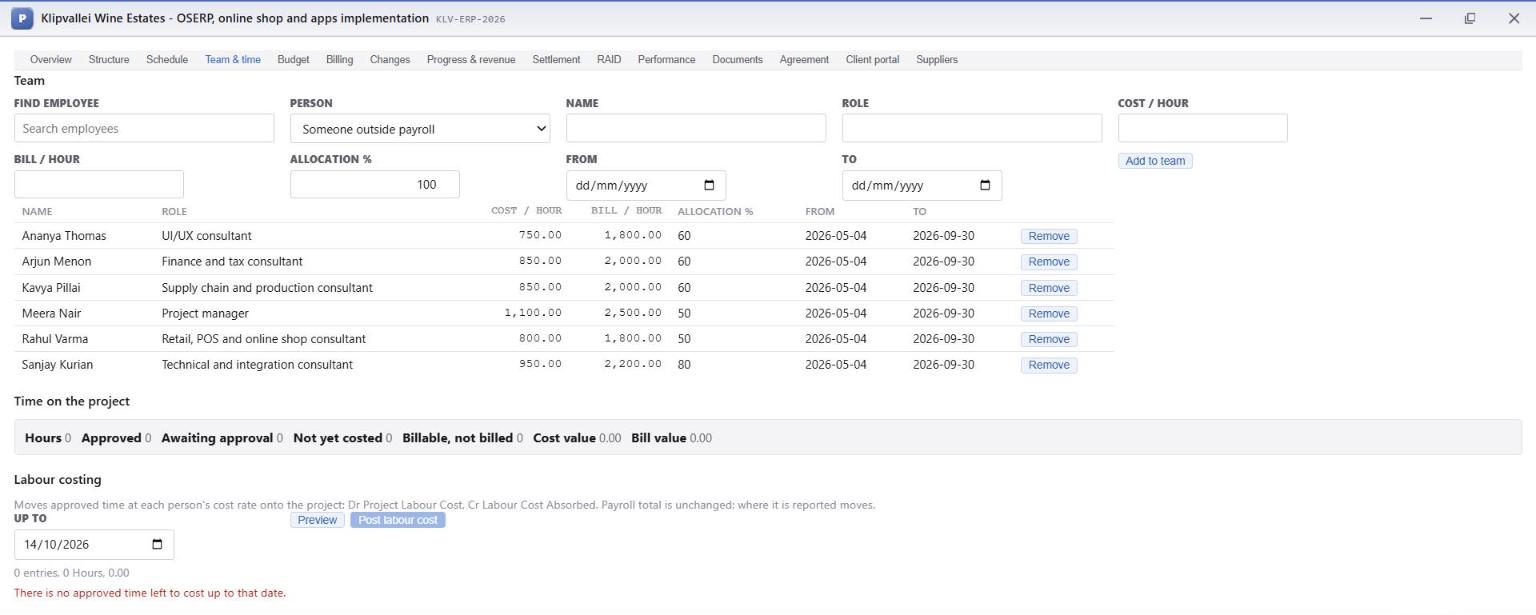
- Cost / hour values their approved hours as project cost (chapter 5).
- Bill / hour prices time-and-materials work and change orders.
- A rate belongs to the person on this project. A rate change is a new line from its date, so hours already booked keep their old rate.
- A person with no rate is reported as unpriced, never valued at zero, because an hour costed at nothing makes a project look more profitable than it is.
3.5 Risks, assumptions, issues and dependencies (RAID tab)
Meera logged what could hurt the project before it started:
| Kind | Entry | Score | Owner |
|---|---|---|---|
| Risk | Load-shedding stops the tasting-room till | 4 x 4 = 16 High | Rahul |
| Risk | Apple rejects an alcohol app without age checks | 3 x 4 = 12 High | Ananya |
| Risk | Excise differs for wine and brandy; wrong duty at removal from bond | 2 x 5 = 10 High | Kavya |
| Risk | The 3.5-hour time difference slows workshops | 2 x 2 = 4 Low | Meera |
| Assumption | The client supplies the Sage Pastel exports by 24 July | Arjun | |
| Dependency | Apple and Google developer accounts opened in the client's name by 30 June | Meera | |
| Decision | Contract in INR, export of services under LUT; exchange risk with the client | Meera | |
| Action | POPIA consent wording approved by the client's legal adviser before go-live | Rahul |
Probability and Impact are scored from 1 to 5. Their product is the score: 1-4 low, 5-9 medium, 10-16 high, 20-25 critical. Each risk has a Response and a Due date. Anything open past its date is counted as overdue on the tab and in My work.
3.6 Documents (Documents tab)
File a document: the signed Statement of work KWE-IT-2026-01, filed as Statement of work with Client sees ticked, and the commercial proposal filed as Other. That one is internal, so the box is left clear. Each document kind comes from the project type, so an implementation files Statement of work, Requirements / design, Test sign-off (UAT), Go-live sign-off and Change request.
What this chapter meant for the money
The work plan is the price list. Every priced item has its own step, every step has an owner, and every person has a cost rate. From here, each hour and each bill lands against the item it belongs to, so the project's profit can be read per item rather than only for the whole project.